By Jordi Daniëls, founder of AI Board ·
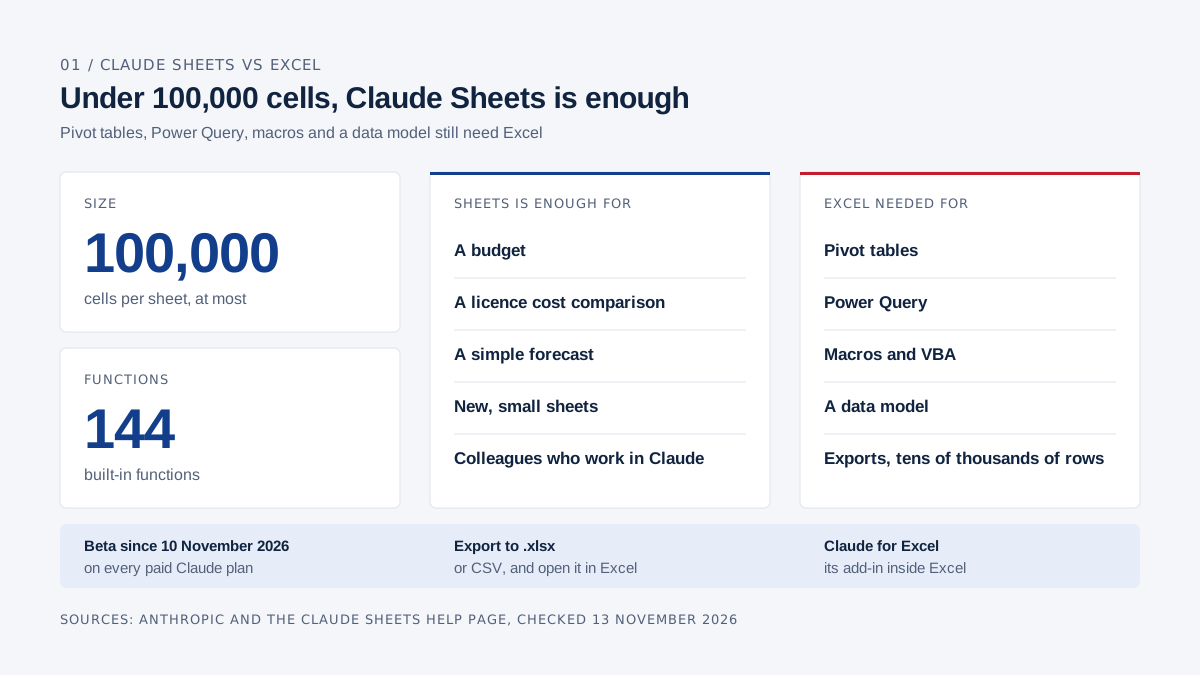
Claude Sheets is enough for a spreadsheet you build and maintain with a few colleagues, such as a budget, a licence cost comparison or a simple forecast, as long as it stays under 100,000 cells. Pivot tables, Power Query, macros, a data model and exports with tens of thousands of rows still need Excel. Sheets has been in beta on every paid Claude plan since 10 November 2026. Anthropic itself calls the feature set simple for now and points to an .xlsx export or Claude for Excel, its add-in inside Excel, when you need the full Excel. Sources: Anthropic's announcement and the Claude Sheets help page, checked 13 November 2026.
On 10 November 2026 Anthropic released Claude Sheets and Claude Whiteboards in beta and made Claude Data generally available. If you pay for Microsoft 365 every month, the next question is whether Excel can go.
Some of your spreadsheets can move. The workbook your controller has kept the budget in for years, linked to three other files and running a macro nobody dares to touch, stays in Excel.
Claude vs Microsoft 365 sets every part of Microsoft 365 against Claude. AI Board runs on Claude itself. Every product claim links to Anthropic's or Microsoft's own page.
What is Claude Sheets and how does it work?
Claude Sheets is a spreadsheet inside Claude that Claude builds for you and then edits with you. You ask for one in a normal conversation, say "build a hiring budget for 2027", or you open the Artifacts tab and pick the Sheets tile. According to the help page you can also import a CSV, import from Excel or Google Sheets, paste data in, or start blank.
From a single prompt Claude produces tabs, formulas that reference other tabs, formatting and drop-downs (Anthropic). The help page adds conditional formatting, checkboxes and charts, including bar, line and pie charts.
Claude outlines every edit as it applies it, so you can see which cells changed. You can select a range and ask a question about it, and version history lets you restore an earlier version. A new sheet is private until you click Share. The people you invite work in the same cells at the same time as you and Claude, and you can leave comments on cells.
Sheets is a beta on Pro, Max, Ultra, Team and Enterprise; the free plan does not have it. It is on by default for Team, while on Enterprise an admin has to switch it on. Work in Sheets counts toward your plan's usage limits. Pro costs $17 a month billed annually and a Team standard seat $20 per user per month, for 2 to 150 users (claude.com/pricing, excluding tax, 13 November 2026).
What can't Claude Sheets do yet?
At launch Claude Sheets lacks pivot tables, macros, Power Query and sheets above 100,000 cells. The full list from the help page, checked 13 November 2026:
| Area | Claude Sheets (beta) |
|---|---|
| Size | Up to 100,000 cells per sheet; the help page gives no separate row limit |
| Functions | 144 built-in functions |
| Spreadsheet features not available yet | Pivot tables, protected ranges, find and replace, multi-column sort, filter views, multi-select drop-downs, PDF export |
| Excel features not supported | Macros, VBA, Power Query, DAX, print layout |
| Live data | A sheet can't pull live data from connected apps, and docs, decks and dashboards can't use a sheet as a data source |
| Phone | Basic read-only access; full editing on web and desktop |
| Compliance | No HIPAA, CMEK or zero data retention yet, because Sheets is a beta |
The help page doesn't say what happens on import to formulas, pivot tables or macros that Sheets doesn't support. Import a copy of any existing workbook and check the formulas that matter.
How do you move a Claude Sheet into Excel?
You download the sheet as an .xlsx or CSV file and open it in Excel. "Send to" passes it on to partner apps; Anthropic names Airtable, Asana, monday.com and Smartsheet.
The help page doesn't say whether formulas survive the .xlsx export. Open your first export in Excel and click through a few formula cells before it goes to your accountant. A CSV holds only the values of one tab, without formulas or formatting.
What is Claude Data?
Claude Data builds dashboards on your company's data through a data connector, and it has been generally available since 10 November 2026. Its earlier name was Claude Dashboards (Anthropic).
According to the Claude Data help page, you first connect a source: a warehouse such as BigQuery, Databricks or Snowflake, or an app you have already connected to Claude, such as Salesforce. Claude writes the SQL and builds the dashboard, and every chart shows its query and when the data was last refreshed. There is no refresh schedule; data refreshes when someone opens the dashboard and a refresh is due.
Two parts are still in beta. Approved queries let your data team sign off official metric definitions, and charts built on them carry a badge. Live sharing shows colleagues current numbers in a shared dashboard, running on your access to the source. Data is on Pro, Max, Ultra, Team and Enterprise; on Enterprise it switches on by default on 19 November 2026.
If your numbers sit in a warehouse or CRM, look at Data. If you type, paste or import them yourself, work in Sheets.
What can Excel do that Claude Sheets can't (yet)?
Excel handles far bigger files and has pivot tables, Power Query, a data model, macros and links between workbooks, all of which Sheets lacks at launch.
- Size: a worksheet holds 1,048,576 rows by 16,384 columns (Microsoft).
- Pivot tables: summarise and analyse a large table in a few clicks (Microsoft).
- Power Query: pull in and clean data from Excel files, CSV, SQL Server, SharePoint lists and more, then refresh it, also in Excel for the web (Microsoft).
- Data model: several related tables feeding one pivot table, through Power Pivot (Microsoft).
- Macros and VBA: desktop only: in Excel for the web you can't create, run or edit VBA macros (Microsoft). Business Basic comes with the web and mobile apps only (Microsoft), so macros need at least Business Standard.
- Workbook links: formulas that point at cells in another workbook (Microsoft).
- Data tables: run one formula across a range of inputs in a single step (Microsoft).
What does Copilot in Excel do?
Copilot in Excel builds and edits workbooks, applies formulas across sheets and creates charts and pivot tables. It has three modes: edit, plan and chat only. All three work on Windows, Mac and the web; on iPhone and Android you get chat only (Microsoft).
Microsoft's Copilot Business pricing page says everyday AI features, such as chat and Copilot in your Microsoft 365 apps, are included with your licence. The Copilot Business add-on gives priority access in Word, Excel, PowerPoint and OneNote. In the Netherlands it costs €18.20 per user per month on annual billing, with a promotional €15.60 until 31 December 2026, first year only. What you get without the add-on is covered in What does Microsoft 365 Copilot cost.
What does Claude for Excel do?
Claude for Excel is an add-in that puts Claude inside Excel, generally available on all paid Claude plans since 7 May 2026 (Anthropic). On its product page Anthropic sums it up as asking about any cell, updating assumptions without breaking formulas, and building models from scratch.
According to the documentation, answers come with cell-level citations you can click to jump to the source. When Claude changes an assumption, formula relationships stay intact and downstream cells recalculate. It traces errors such as #REF! and #DIV/0! back to their cause, builds a model or fills an existing template across tabs, and can sort, filter, edit pivot tables and create drop-downs. Data tables and macros or VBA are out of scope.
It runs in Excel for the web, in Excel on Windows with a Microsoft 365 subscription and on the Mac from version 16.46; it doesn't run in Excel 2016 or 2019 bought as a perpetual licence, or on the iPad. Its activity is not included in Enterprise audit logs. Anthropic also warns that outside files, such as a template downloaded from the web or a supplier's export, can carry hidden instructions, so use it with workbooks you trust.
Claude for Excel needs Excel, and with it a Microsoft 365 licence. Claude Sheets needs no Microsoft licence at all.
Which tool fits which task?
Claude Sheets covers new, small sheets you share; Excel stays the base for large exports, pivot tables, macros and files that leave the building.
| Task | Claude Sheets | Excel (with or without Copilot) | Claude for Excel | What I would pick |
|---|---|---|---|---|
| Next year's budget | Good for a first draft: a tab per department, cross-tab formulas, shared with the management team | Needed when the budget has to tie into your controller's workbook | Flex assumptions in the existing budget with formulas intact | Draft in Sheets, final version in Excel if that's where your controller works |
| Licence cost comparison | Fits, see the example below | Works too | Useful if it becomes a tab in your existing cost overview | Sheets |
| Sales forecast | Formulas, drop-downs and charts; no live CRM data | Power Query on a CRM export, a data table for scenarios | Change the growth rate and show the impact | Sheets; Claude Data if the numbers live in a CRM or warehouse |
| Export from your accounting system, 50,000 rows | Doesn't fit: at eight columns that is 400,000 cells against a 100,000 limit | Fits easily, with Power Query to clean it | Ask questions about the export inside Excel | Excel |
| Pivot table for the management team | No pivot tables yet | Yes, and Copilot can build them | Can edit pivot tables | Excel |
| File shared with your accountant | Sharing outside your organisation depends on your admin; .xlsx export works | You share or email the .xlsx yourself | Works in whatever file you share | Excel, or an .xlsx export from Sheets |
| A macro from 2014 | No macros or VBA | Desktop only, not in Excel for the web | No macros or VBA | Excel on the desktop |
On Claude Team, email invitations to people outside your organisation are on by default; on Enterprise they are off, and the invitee needs a Claude account (admin guide, sharing). An accountant who doesn't use Claude gets an .xlsx.
Example: comparing licence costs in Claude Sheets
The managing director of a ten-person company wants to show the management team what Microsoft 365, Copilot and Claude cost per year, in five combinations. The prices below are the euro prices Microsoft and Anthropic show in the Netherlands. This is what you type into Claude:
Build a sheet comparing our licence costs per year,
excluding VAT, on annual billing.

Tab Prices: price per user per month for each product.
- Microsoft 365 Business Basic: 6.07
- Microsoft 365 Business Standard: 12.13
- Business Standard with Copilot Business: 20.36
- Exchange Online (Plan 1): 3.50
- Claude Team, standard seat: 18.00

Tab Comparison: put the number of users (10) in one input cell
at the top. Build five scenarios:
1. Business Standard
2. Business Standard with Copilot Business
3. Business Standard plus Claude Team
4. Business Basic plus Claude Team
5. Exchange Online (Plan 1) plus Claude Team

For each scenario, calculate the price per user per month and the cost
per year with formulas that reference Prices and the input cell. Add a
Decision column with a drop-down: keep, unsure, drop.
Amounts in euros with two decimals, header row in bold.
You get a sheet with two tabs, formulas, formatting and a drop-down, and Claude outlines what it puts in which cells as it goes. Claude picks its own column names and cell addresses, so check the result against these amounts:
| Scenario | Per user per month | Formula for the yearly cost (example) | Per year, 10 users |
|---|---|---|---|
| 1. Business Standard | €12.13 | =Prices!B3*$B$1*12 | €1,455.60 |
| 2. Business Standard with Copilot Business | €20.36 | =Prices!B4*$B$1*12 | €2,443.20 |
| 3. Business Standard plus Claude Team | €30.13 | =(Prices!B3+Prices!B6)*$B$1*12 | €3,615.60 |
| 4. Business Basic plus Claude Team | €24.07 | =(Prices!B2+Prices!B6)*$B$1*12 | €2,888.40 |
| 5. Exchange Online (Plan 1) plus Claude Team | €21.50 | =(Prices!B5+Prices!B6)*$B$1*12 | €2,580.00 |
Prices per user per month on annual billing, excluding VAT, as shown in the Netherlands on 13 November 2026. Sources: Microsoft 365 Business, Exchange Online, Copilot Business and Claude.
Then you keep going in the same conversation. "Set the number of users to 14" changes one cell, and all five scenarios recalculate. "Put the separate Copilot Business add-on at €18.20 next to the bundle" shows that Business Standard plus the separate add-on comes to €30.33 per user per month, against €20.36 for the bundle.
Some things the table can't show, so add them yourself. Scenario 4 gives you Excel on the web and on phones only. Scenario 5 gives you email through Exchange Online, but no Excel, no Teams and therefore no Claude for Excel.
The same comparison in Excel
In Excel you build the same comparison with the same formulas, by hand, with Copilot or with Claude for Excel. With Claude for Excel you open an empty workbook, paste the prompt into the sidebar, and Claude writes the tabs and formulas into your workbook.
You can then ask "Which assumption makes scenario 3 more expensive than scenario 2?" and Claude answers with citations to the cells. Ask "Use the monthly Claude Team price of €21.04 instead" and Claude updates the price cell while the formulas stay in place.
In Excel you can also drop the comparison into your existing budget as a tab and link it to the headcount plan, and a data table shows the cost for 5 to 50 users in one step. You build that data table yourself under Data, What-If Analysis, because Claude for Excel doesn't support data tables. In Sheets you would ask Claude for a column of 5 to 50 users with ordinary formulas next to it.
When is Claude Sheets enough, and when do you keep Excel?
Claude Sheets is enough when the sheet is new, stays under 100,000 cells and is shared mostly with colleagues who also work in Claude. Formulas, drop-downs, conditional formatting and charts are all there.
You keep Excel when your exports from the accounting system or ERP are bigger, when the management team wants a pivot table, when numbers arrive through Power Query or a data model, when your files contain macros, or when your accountant, bank or controller expects an .xlsx with links.
Sheets is three days old and in beta. Anthropic says more features are coming, so this list may look different in a few months. I wouldn't keep a company's final budget only in a beta product today; keep an .xlsx export of every sheet that matters.
My advice to executives is to start new, small sheets in Claude Sheets and leave the controller's workbooks in Excel. If you spend a lot of time in those workbooks yourself, Claude for Excel gives you Claude inside Excel without moving anything. How Word, PowerPoint, email and Teams compare is in Claude vs Microsoft 365; what the Claude plans cost is in Claude for business.
Frequently asked questions
Is Claude Sheets free?
No. Claude Sheets is part of the paid plans only: Pro, Max, Ultra, Team and Enterprise. Pro costs $17 a month billed annually or $20 monthly, and a Team standard seat $20 per user per month billed annually or $25 monthly, excluding tax (claude.com/pricing, 13 November 2026).
Can I open an existing Excel file in Claude Sheets?
Yes, you can import from Excel or paste data from it (help page). The help page doesn't say what happens to macros, pivot tables or functions that Sheets doesn't support, so work on a copy and keep the original in Excel.
How many rows can Claude Sheets handle?
A sheet holds up to 100,000 cells, and Anthropic gives no separate row limit. With ten columns that is 10,000 rows. Excel allows 1,048,576 rows per worksheet.
What is the difference between Claude Sheets, Claude for Excel and Claude in Google Sheets?
Claude Sheets is a spreadsheet inside Claude itself, with no Microsoft or Google licence needed. Claude for Excel is an add-in inside Excel, generally available since 7 May 2026. Claude in Google Docs, Sheets and Slides is a sidebar in Google's apps, still in beta, installed from Google's Marketplace (help page).
Do I still need Microsoft 365 if I use Claude Sheets?
Not for Claude Sheets itself. You do for Claude for Excel, which runs inside Excel. Claude also has no mailbox of its own, so you need email hosting either way. What you can cancel and what you keep is covered in Claude vs Microsoft 365.
AI Board is your personal AI assistant that makes you AI-native: it runs on your own laptop, grounded in your company's data, and gets sharper as your knowledge grows. Private by design, reasoning at CEO, CFO and CTO level, so you ride the AI wave instead of swimming behind it.