By Jordi Daniëls, founder of AI Board ·
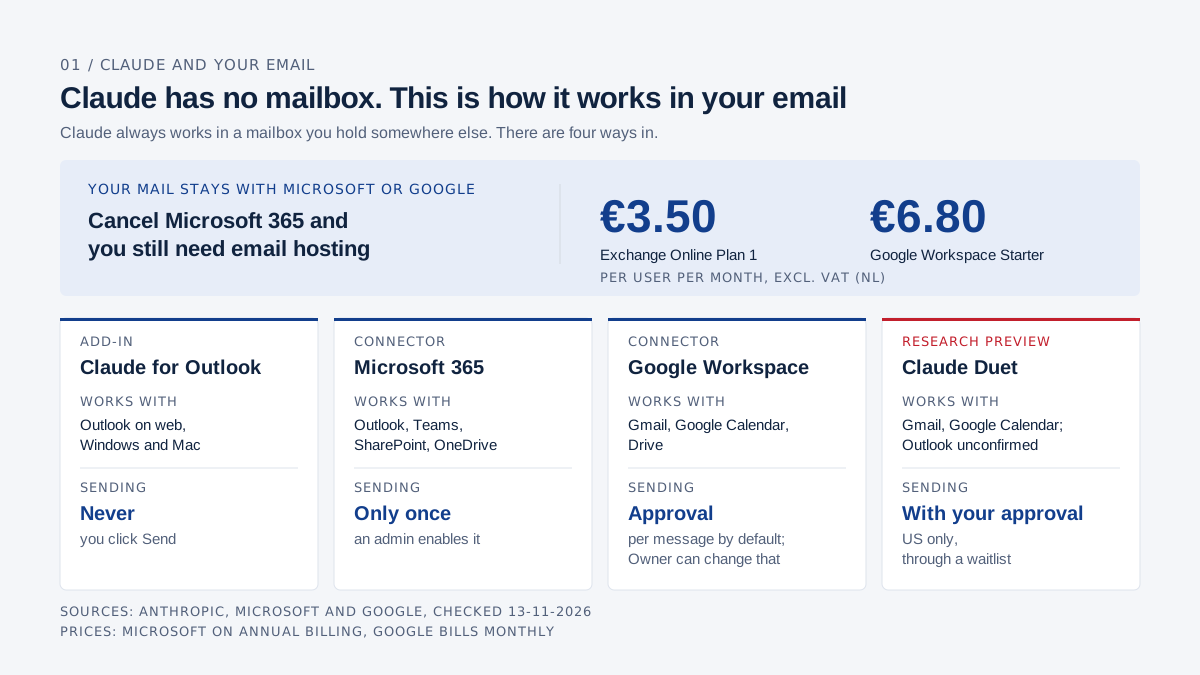
You can drop Microsoft 365, but not your mailbox: Claude has no email client and no mailbox of its own, so your mail always lives with a provider such as Microsoft or Google. Claude works inside that mailbox through Claude for Outlook (an Outlook add-in, in beta on all paid plans), the Microsoft 365 connector, or the Google Workspace connector for Gmail. Claude Duet, an app that watches your inbox for you, is a US-only research preview. If you cancel Microsoft 365 you still need email hosting, for example Exchange Online Plan 1 at €3.50 or Google Workspace Starter at €6.80 per user per month in the Netherlands, excluding VAT. Checked 13 November 2026.
Claude's own Docs, Sheets and Slides take over part of what Word, Excel and PowerPoint do, but not email, because Anthropic does not run mail servers. The full comparison is in Claude vs Microsoft 365.
Keep Exchange Online if you want Claude for Outlook, and use the Google Workspace connector if you move to Gmail. If Copilot is already in your Outlook, its pricing is in What does Microsoft 365 Copilot cost.
AI Board runs on Claude. Every claim about Claude below links to an Anthropic page, and every price to the vendor that sets it.
Does Claude have its own email app?
No. Claude always works in a mailbox you hold somewhere else. Anthropic does not issue email addresses or host mailboxes; with your permission, Claude reads and writes in the mail you keep at Microsoft, Google or another provider.
There are four ways in. Claude for Outlook is a side panel inside Outlook. The Microsoft 365 connector links Claude itself to your Outlook mail, calendar, Teams, SharePoint and OneDrive. The Google Workspace connector does the same for Gmail, Google Calendar and Drive. Claude Duet is a separate app that monitors your mail and calendar, available only in the US for now.
What does Claude for Outlook do?
Claude for Outlook puts Claude in a side panel next to your Outlook inbox and calendar, where it triages mail, drafts replies and finds meeting times, but never sends anything. Anthropic launched it on 7 May 2026 as a public beta on all paid plans. A Free account can install it but cannot finish signing in, according to Anthropic's documentation.
That documentation lists what it does:
- Triage your unread mail into what needs you, what Claude can handle, and noise you can archive in one selection. Every action item gets a one-line reason.
- Draft replies, reply-alls and forwards, unsent in Outlook's own compose pane, in your writing style if you let Claude learn it.
- Summarise long threads into decisions, open items and who owes what, with a citation to the email behind each point.
- Read .docx and .xlsx attachments without opening them. PDFs are not read inline yet; you save the file and upload it in the panel.
- Find meeting times across the calendars you can see and draft the invite into Outlook's appointment form.
- Prep you for your next meeting with a one-page brief.
It cannot send. Anthropic states that the add-in does not even request Microsoft's Mail.Send permission. Every draft and every invite waits in Outlook until you click Send.
Which Outlook does it run on, and how do you install it?
Claude for Outlook runs in Outlook on the web, in new and classic Outlook for Windows, and in Outlook for Mac, with a mailbox on Exchange Online through Microsoft 365. For Windows and Mac, Anthropic lists a Microsoft 365 subscription as a requirement.
It does not run in Outlook for iOS or Android, in perpetual Outlook 2016 or 2019, or against an on-premises Exchange server. Gmail, IMAP and POP accounts added to Outlook are not supported. Neither are shared or delegated mailboxes, so the info@ inbox or your assistant's mailbox stays outside its reach.
You install it from the AppSource listing with Get it now, then select an email in Outlook, choose the Claude button and sign in with your Claude account. An organisation-wide deployment by your admin can take up to 72 hours to appear.
Triage, mailbox search and free/busy lookups need a one-time approval to read your mailbox through Microsoft Graph. In many organisations only a Global Administrator can grant it, once for the whole tenant. Until then, Claude works only on the email you have open.
Whatever Claude reads from your mailbox becomes part of the prompt sent to Anthropic, which deletes inputs and outputs within 30 days, with the exceptions set out in its privacy policy. Claude for Outlook is not included in Enterprise audit logs, according to the documentation.
What can the Microsoft 365 connector do with your email?
The Microsoft 365 connector lets Claude search your Outlook mail, calendar, Teams, SharePoint and OneDrive from within Claude, and with write access it can send mail too. It is available on every plan, Free included, according to Anthropic.
The add-in looks at your inbox. The connector pulls sources together, which suits a question like "list every open point on the 2027 budget from my mail, Teams and SharePoint".
Write tools arrived on 7 July 2026: drafting, sending and organising email, managing calendar events, updating mailbox settings, and creating files in OneDrive and SharePoint. Sending Teams messages followed in September 2026, according to the help page.
For work accounts those tools stay off until your administrators switch them on. "Permissions are read-only by default," says Anthropic's admin guide. A Microsoft Entra administrator consents to the extra permissions, and an admin in Claude enables the write tools.
Admins then set each tool to Always allow, Needs approval or Blocked. On Team and Enterprise, sending, forwarding and calendar invites currently ask for approval every time by default. The same guide names 9 November and 9 December 2026 as dates when that default changes, so check with your admin how yours is set.
Mail Claude sends through the connector carries a header marking it as agent-initiated, and the write tools cannot attach files. With a personal Outlook.com account, the connector works on Free through Ultra for Outlook and OneDrive, with no admin involved.
What can Claude do with Gmail?
The Google Workspace connector lets Claude search and read your Gmail, create drafts, and send, reply to and forward messages, asking for your approval before each one by default. "By default, Claude asks for your approval before each of these actions," says Anthropic's help page.
Claude also manages labels and threads, and sees attachment metadata but not the contents. In Google Calendar it creates events and finds a time that suits everyone.
On Team and Enterprise, an Owner enables the connector first and decides whether members may let sending run without a prompt each time. Your Google Workspace admin may also need to mark Claude as a trusted app.
Anthropic's documentation disagrees with itself here. One documentation page still describes the Gmail connector as read-only, while the help page and the connector listing show sending. Send yourself one test message before you rely on it.
What is Claude Duet?
Claude Duet is a separate Anthropic app that watches your mail and calendar, briefs you every morning and prepares draft replies for you to approve. It is a research preview for Pro, Max and Ultra subscribers in the US only, through a waitlist, according to the help centre. Team and Enterprise are planned for later.
Anthropic announced it on 21 October 2026. Duet is an app for iOS and Android, and on a computer you use it through claude.ai, per the product page. It is designed to ask before it sends a message, and Anthropic warns that it can misread a thread or misjudge what is urgent.
Which mailboxes Duet reads is only half clear. The help centre names Gmail and Google Calendar. The product page shows a Microsoft and Office 365 logo, but the help centre never mentions Outlook or Microsoft 365, so I cannot confirm Duet works with Outlook mail. Outside the US you cannot use it yet.
Which route fits your email?
On Microsoft 365, use Claude for Outlook for your inbox and the Microsoft 365 connector for questions that span mail, Teams and files. On Gmail, use the Google Workspace connector.
| Claude for Outlook | Microsoft 365 connector | Google Workspace connector | Claude Duet | |
|---|---|---|---|---|
| Works with | Outlook on web, Windows and Mac, mailbox on Exchange Online | Outlook mail and calendar, Teams, SharePoint, OneDrive | Gmail, Google Calendar, Drive | Gmail and Google Calendar named; Outlook unconfirmed |
| What Claude may do | Triage, summarise, read attachments, draft replies and invites | Read and search; with write tools send mail, edit calendar and files | Search, read, draft, label, send | Morning brief, flag what needs you, draft replies |
| Sending | Never, you click Send | Only once an admin enables it; approval per send on Team and Enterprise for now | Approval per message by default; Owner can change that | With your approval |
| Plans | All paid plans | Every plan, Free included | All users per the help page; Team and Enterprise via the Owner | Pro, Max, Ultra, US only |
| Status | Beta since 7 May 2026 | Write tools since 7 July 2026 | Available | Research preview, waitlist |
| Cost besides Claude | Microsoft 365 with Exchange Online | Microsoft 365 | Google Workspace, from €6.80 | No separate price given |
Sources, checked 13 November 2026: Claude for Outlook, Microsoft 365 connector, Google Workspace connectors, Claude Duet.
Why let Claude draft and send it yourself?
Let Claude write the draft and click Send yourself, so that everything leaving under your name passes your eyes first. For a managing director that matters more than for most, because an email to a customer, the bank or a shareholder is a commitment.
Inbound mail can carry instructions. Anthropic's documentation warns about prompt injection: hidden text in an email body, signature or attachment that tries to get Claude to forward a thread or reply on its own. If you send, you see that draft before it goes anywhere.
During the beta, Anthropic does not recommend Claude for Outlook for unattended sending, or for client and counterparty mail you have not read first.
A wrong figure in a quote, or a reply-all with your supplier in copy, cannot be pulled back. Claude warns you about new recipients, but it does not check anything at the moment you click Send. If you want a final review, ask for one.
I advise executives never to set sending to Always allow. The time you save is in reading, sorting and drafting, and the click on Send takes two seconds per email.
What does a morning with 60 emails look like?
With Claude for Outlook, a morning with 60 unread emails becomes a handful of questions in the side panel and a stack of drafts waiting for your click. Take an invented Monday: you run a 40-person installation company, 60 emails arrived since Friday afternoon, and your admin has already approved mailbox access.
"What needs me?" Claude sorts the unread mail into three groups, with a one-line reason for each action item:
| Group | Count | Examples |
|---|---|---|
| Needs you | 7 | Q3 figures from your controller as an .xlsx; a customer asking to discuss the quote; the bank requesting documents to renew the credit line |
| Claude can handle | 15 | Receipt confirmations, a supplier checking that Thursday still stands |
| Noise | 38 | Newsletters, calendar responses, system notifications |
"Archive all the calendar responses and newsletters." The noise goes in one selection.
"Draft replies for everything you can handle." Fifteen drafts sit unsent in Outlook, with no sign-off, so your own signature goes underneath. You read them, change two and send them yourself.
"What's in the spreadsheet on this email?" Claude reads the quarterly figures without you opening the file and summarises the main numbers. If the customer's quote arrived as a PDF, you upload it in the panel.
"What's been decided and what's still open?" On the thread about the management meeting you get the decisions, the open items and who owes what, each linked to its email.
"Find 45 minutes next week with the controller and the operations manager for the 2027 budget." Claude proposes slots within working hours and drafts the invite. Nothing is saved or sent until you click.
You end up with seven emails that really are yours and an inbox without noise.
Cancelling Microsoft 365: where does your email go?
If you cancel Microsoft 365, you still need email hosting, because Claude will not hold your mail. After that, Claude for Outlook only works if that hosting is Microsoft's own Exchange Online. Keep only Exchange Online in the same Microsoft tenant and your mail doesn't have to move; how that works is in Cancel Microsoft 365 and keep only Exchange Online.
| Email hosting | Per user per month, excl. VAT (NL) | What you get | Email with Claude |
|---|---|---|---|
| Exchange Online (Plan 1) | €3.50 | 50 GB mailbox, Outlook on the web | Microsoft 365 connector; Claude for Outlook unconfirmed |
| Exchange Online (Plan 2) | €6.90 | Adds archiving, Litigation Hold and DLP, among others | Same |
| Microsoft 365 Business Basic | €6.07 | Exchange mail (100 GB), Teams, 1 TB OneDrive, web and mobile apps | Claude for Outlook on the web; the connector |
| Microsoft 365 Business Standard | €12.13 | As Basic, plus desktop apps on 5 PCs or Macs | Claude for Outlook in Outlook for Windows and Mac too |
| Google Workspace Starter | €6.80, flexible plan | Business email address, 30 GB storage per person | Google Workspace connector |
| Another provider (IMAP or POP) | varies | varies | No Anthropic connector found |
Sources, checked 13 November 2026: Microsoft 365 Business, Exchange Online and features per plan, Microsoft on annual billing. Google Workspace bills monthly and gives 16% off with a one-year contract.
Whether Exchange Online Plan 1 on its own is enough for Claude for Outlook is not confirmed. Anthropic requires a mailbox on Exchange Online through Microsoft 365 and supports Outlook on the web, and Plan 1 gives you both, but Anthropic never names Plan 1. Test it with one mailbox before you move everyone. Connecting desktop Outlook to Plan 1 needs a separate licence for the desktop apps, according to Microsoft.
Business Basic costs €2.57 per person per month more than Plan 1, and for that you keep Teams and OneDrive. If your team lives in Teams all day, I would not cancel Microsoft 365 to save on email.
What happens to your data when you cancel?
Microsoft deletes your data after you cancel. The footnote on the pricing page says that cancelling removes all associated data, including mail and OneDrive files.
Microsoft Learn sets out the timing. After a cancellation within the cancellation window, only admins can still reach the data. Whatever is left might be deleted after 90 days and will be deleted no later than 180 days after cancellation. If you delete the subscription explicitly, SharePoint and OneDrive go immediately.
Export first:
- mail, calendar and contacts: classic Outlook for Windows exports all of it to a .pst file, while new Outlook exports email only, according to Microsoft;
- files in OneDrive and SharePoint;
- shared mailboxes such as info@, plus your rules and signatures;
- Teams conversations holding agreements you want to keep.
Migrate the mailboxes before you cancel. Your addresses stay yours as long as you own the domain; you point its MX records at the new provider.
Frequently asked questions
Does Claude have its own email address or mailbox?
No. Anthropic does not issue addresses or host mailboxes, so cancelling Microsoft 365 still leaves you needing email hosting.
Can Claude send emails on its own?
It depends on the route. Claude for Outlook never sends. The Microsoft 365 connector can send once your admin enables write tools, and the Google Workspace connector asks for approval per message by default. Sources: Claude for Outlook, Microsoft 365, Google Workspace.
Does Claude for Outlook work with Gmail or on my phone?
No. Gmail, IMAP and POP accounts in Outlook are not supported, and neither is Outlook for iOS or Android, according to Anthropic. On your phone, use the Claude app with one of the connectors.
Is Exchange Online Plan 1 enough for Claude for Outlook?
That is not confirmed. Plan 1 (€3.50 per user per month in the Netherlands) gives you an Exchange Online mailbox and Outlook on the web, which is what Anthropic asks for, but Anthropic does not name Plan 1 anywhere. Test it with one mailbox before switching.
Can Claude work in a shared mailbox like info@?
Not through Claude for Outlook, which only works in your own mailbox. The Microsoft 365 connector does search the shared mailboxes you can access, according to the admin guide.
What does email with Claude cost per month?
Claude Pro is $17 a month on annual billing ($20 monthly) and a standard Team seat $20 ($25 monthly), excluding tax, per claude.com/pricing. Add your email hosting: Business Basic, Exchange Online Plan 1 or Google Workspace Starter. Pro falls under Anthropic's consumer terms; what that means for company data is in Claude for business, and every AI cost side by side is in what AI costs your business.
AI Board is your personal AI assistant that makes you AI-native: it runs on your own laptop, grounded in your company's data, and gets sharper as your knowledge grows. Private by design, reasoning at CEO, CFO and CTO level, so you ride the AI wave instead of swimming behind it.