By Jordi Daniëls, founder of AI Board ·
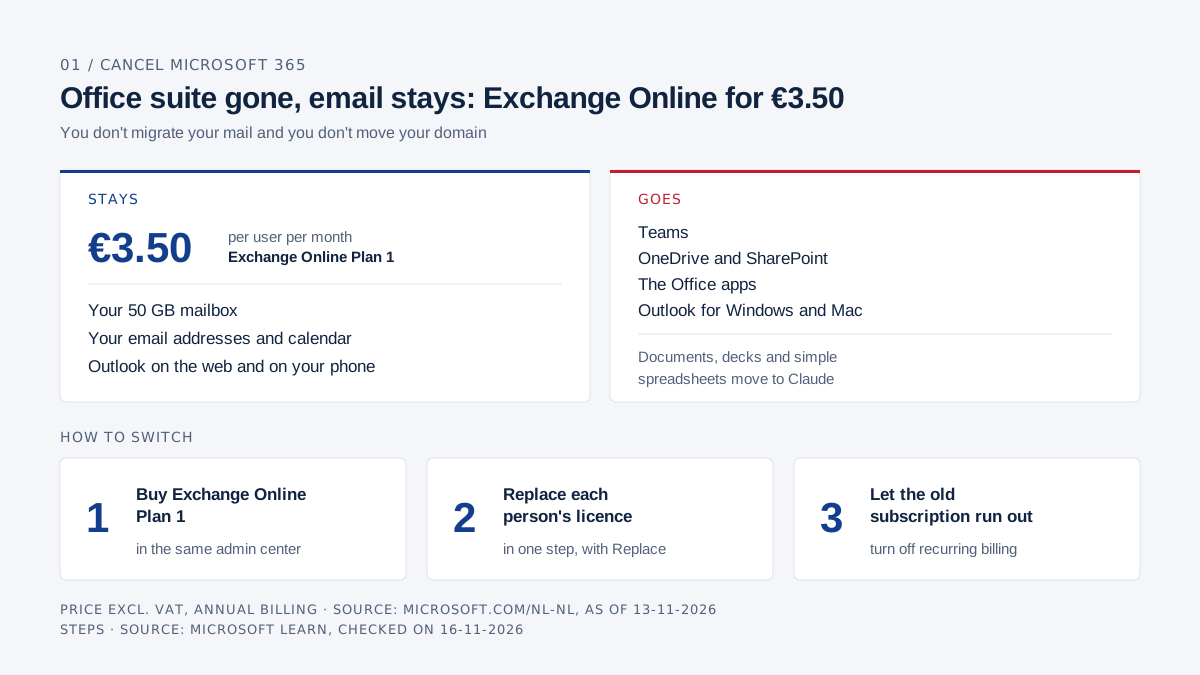
Yes, and you don't have to move your email: buy Exchange Online Plan 1 in the same Microsoft admin center, replace each person's Microsoft 365 licence, then let the old subscription run out. Your mailbox, email addresses and calendar stay where they are. Teams, OneDrive, SharePoint and the Office apps go; documents, decks and simple spreadsheets move to Claude. Plan 1 costs €3.50 per user per month with a 50 GB mailbox, excluding VAT on annual billing. You use Outlook on the web and on your phone, and Claude for Outlook runs in Outlook on the web. Prices as of 13 November 2026, Microsoft and Anthropic terms checked on 16 November 2026.
What Claude Docs, Slides and Sheets take over from Word, PowerPoint and Excel is covered in Claude vs Microsoft 365.
AI Board helps companies with licence advice and with rolling out Claude, and runs on Claude itself. Every term and every price links to Microsoft or Anthropic.
Can you cancel Microsoft 365 and keep only your email?
Yes. Exchange Online is sold on its own, as Plan 1 or Plan 2, and it runs in the same Microsoft tenant as your current Microsoft 365. You don't migrate your mail to another provider and you don't move your domain.
Microsoft describes Exchange Online as a service for "email, calendar, contacts, and tasks" in its service description. That is exactly what you keep. The rest of the suite you cancel.
You also don't have to move everyone at once. Licences are assigned per person, so the controller who lives in Excel can keep Microsoft 365 while the rest go to email only.
What do Exchange Online Plan 1 and Plan 2 include?
Plan 1 is a 50 GB mailbox with a 50 GB archive; Plan 2 gives 100 GB, an archive that can grow to 1.5 TB, and the retention and compliance features. For most small companies Plan 1 is enough.
| Exchange Online Plan 1 | Exchange Online Plan 2 | Microsoft 365 Business Basic | |
|---|---|---|---|
| Price per user per month, excl. VAT, annual billing (NL) | €3.50 | €6.90 | €6.07 |
| Mailbox | 50 GB | 100 GB | 100 GB |
| Archive mailbox | 50 GB | up to 1.5 TB | 50 GB |
| Outlook on the web and on your phone | yes | yes | yes |
| Outlook for Windows and Mac | separate licence needed | separate licence needed | separate licence needed |
| Litigation Hold and Data Loss Prevention | no | yes | no |
| Teams, OneDrive and Office on the web | no | no | yes |
Sources: Dutch prices on Microsoft's Exchange Online page and Microsoft 365 Business page on 13 November 2026; mailbox sizes in the Exchange Online limits; features in the service description.
Footnote 8 of the service description says that connecting Business Basic or Exchange Online Plan 1 or 2 to Outlook for Windows, classic Outlook or Outlook for Mac "requires that those applications first be licensed with an account that includes the rights to Microsoft 365 desktop apps". With Exchange Online alone, you work in Outlook on the web and in the Outlook app on your phone.
What do you lose when you keep only Exchange Online?
You lose Teams, OneDrive and SharePoint, the Office apps and the bigger mailbox. Item by item:
| What goes | What it means | How you cover it |
|---|---|---|
| Word, PowerPoint and Excel (web and desktop) | No Office apps of your own | Claude Docs, Slides and Sheets; export to .docx, .pptx and .xlsx |
| Teams | No chat and no Teams meetings from your own account | Google Meet or Zoom; Claude Meetings works only in Google Meet |
| OneDrive and SharePoint | No 1 TB per person and no team sites | Another storage service, or Business Basic for the people who need it |
| Outlook for Windows and Mac | Only Outlook on the web and on your phone | Outlook on the web, with Claude for Outlook |
| 100 GB mailbox | 50 GB on Plan 1 | Plan 2 for anyone with a bigger mailbox |
What Claude takes over, product by product, is in Claude Docs vs Word, Claude Slides vs PowerPoint and Claude Sheets vs Excel. The first draft of a proposal, report or deck works well in Claude. A client's Word file full of tracked changes, or a large Excel model with macros, does not.
Look in Outlook on the web at how big each mailbox is today. Anyone above 50 GB gets Plan 2.
Does Claude for Outlook work with Exchange Online alone?
In Outlook on the web it does, as far as Anthropic and Microsoft describe it. Anthropic lists Outlook on the web as supported with no further condition and requires "Exchange Online through Microsoft 365", according to the Claude for Outlook documentation. Exchange Online Plan 1 gives you exactly that.
For Outlook on Windows and Mac, Anthropic says "with a Microsoft 365 subscription", and Microsoft's licence rule above applies on top. With Plan 1 alone, you use Claude for Outlook in the browser.
Three things to know first:
- Claude for Outlook is in beta and works on Pro, Max, Team and Enterprise, not on Free.
- For search, triage and calendars, the add-in asks for access through Microsoft Graph. A Global Administrator or Cloud Application Administrator grants it once for the whole organisation.
- Claude for Outlook works only in your own mailbox, not in info@ or in a mailbox you open as a delegate.
Claude for Outlook never sends anything itself: every draft lands unsent in Outlook's compose pane and you click Send. More on email with Claude, Gmail included, is in Claude for email.
Anthropic does not name Plan 1 specifically, and I have not tested it in a tenant with Plan 1 only. So move one person first and try Claude for Outlook there before you move the rest.
What does it cost, and what do you save?
Per person you save €30.84 a year going from Business Basic to Plan 1, and €103.56 a year coming from Business Standard. With Claude added you pay more in total than for Business Standard alone; you swap the Office suite for Claude.
Per person per year, excluding VAT, annual billing, using the prices in the table above and a standard Claude Team seat at €18 a month (claude.com/pricing):
| Setup | Per person per year | 5 people | 20 people |
|---|---|---|---|
| Business Standard, no Claude | €145.56 | €727.80 | €2,911.20 |
| Business Standard plus Claude Team | €361.56 | €1,807.80 | €7,231.20 |
| Business Basic plus Claude Team | €288.84 | €1,444.20 | €5,776.80 |
| Exchange Online Plan 1 plus Claude Team | €258 | €1,290 | €5,160 |
| Exchange Online Plan 1 plus Claude Pro (one person) | €222 |
If you already run Claude Team next to Business Standard, moving to Exchange Online only saves €517.80 a year for five people and €2,071.20 for twenty. Claude Team is for 2 to 150 users; on your own you end up on Pro, which is worked out in Claude or Microsoft 365 for freelancers.
Count the switch itself too: someone has to secure the files in OneDrive and SharePoint, and people need a few weeks to get used to Claude Docs instead of Word.
How do you switch licences to Exchange Online?
You buy Exchange Online, replace each person's licence and check that mail and Claude work. Only then do you cancel the old subscription. Step by step:
- Make a list. Note per person who really needs Teams, OneDrive, SharePoint or desktop Office. They keep their current licence.
- Secure the files. Have everyone who moves download their OneDrive, and move shared SharePoint files somewhere else. Microsoft recommends this before moving someone to a subscription with fewer services, in Move users to a different subscription.
- Buy Exchange Online Plan 1 in the Microsoft 365 admin center, for the number of people who move.
- Replace the licence. Go to Users, Active users, select the people, choose Manage product licenses, then Replace. Pick Exchange Online (Plan 1) and save. Doing it in one step means nobody is ever without a mailbox licence.
- Test with one person. Sign in to Outlook on the web, send and receive a message, and install Claude for Outlook. Have the admin grant the Graph consent.
- Move the rest once the test works.
- Cancel the old subscription, or turn off recurring billing.
Start with a test person who uses Teams very little. You'll quickly see what is missing in daily work.
How and when do you cancel the old subscription?
Cancel around your renewal date, because on an annual subscription you usually pay out the term. For subscriptions under a Microsoft Customer Agreement (MCA), the normal type when you buy directly from Microsoft today, you have seven days after the start or renewal to cancel with a refund, according to Microsoft. After that you turn off recurring billing and keep access until the end of the term. If you pay an annual subscription monthly, you keep paying those months. On the older MOSA account type, cancelling gives a prorated credit. The admin center shows which billing account type you have.
You cancel in the admin center under Billing, Your products, or Subscriptions in the simplified view. Select the subscription, then Cancel subscription, or turn off recurring billing outside the window.
After it ends, a subscription goes through fixed stages, according to Microsoft Learn: for many subscriptions 30 days expired first, then 90 days disabled, then deleted. In the disabled stage, users with a licence from the old subscription can no longer reach their apps and only admins can reach the data. So make sure everyone is already on Exchange Online.
Two warnings from Microsoft:
- Don't delete the subscription yourself. That skips the in-between stages and SharePoint and OneDrive are gone immediately.
- An unlicensed OneDrive gets locked. A OneDrive without a licence goes read-only after 60 days and is archived after 93 days. After that you only get back in by assigning a licence with OneDrive again or by paying for archive storage, according to Manage unlicensed OneDrive accounts. So download the files before the switch.
Microsoft also says you must remove your own domain before you cancel. I read that as a step for leaving Microsoft altogether. In this route you stay in the same tenant and your domain stays in use for Exchange Online. If you're unsure about your setup, have your admin or Microsoft partner look before you click Cancel.
Who is this not for?
Exchange Online alone doesn't fit if your company runs on Teams, if someone works in large Excel models, or if clients send back Word files with tracked changes. Keep Microsoft 365 for those people.
It also doesn't fit if your lawyer wants retention, Litigation Hold or eDiscovery: that comes with Plan 2 or Business Premium, not Plan 1. And if you want Claude to work in shared mailboxes such as info@, Claude for Outlook isn't built for that today; Claude's Microsoft 365 connector does search the shared mailboxes you can access.
If your leadership team mostly writes proposals, reports and decks, and everyone already meets in Google Meet or Zoom, Exchange Online plus Claude is a sensible route.
Frequently asked questions
Will I lose my email when I move to Exchange Online?
Not if you stay in the same Microsoft tenant and replace the licence in one step. Both licences include an Exchange Online mailbox, so your mail doesn't have to move. Microsoft does recommend a backup before moving to a subscription with fewer services, so test with one person first.
What is the difference between Exchange Online Plan 1 and Plan 2?
Plan 1 costs €3.50 per user per month and gives a 50 GB mailbox. Plan 2 costs €6.90 and gives 100 GB, an archive up to 1.5 TB, Litigation Hold and Data Loss Prevention. Sources: Microsoft and the limits.
Can I use Outlook on my laptop with Exchange Online Plan 1?
Not without a separate licence. Microsoft says Outlook for Windows and Mac may be connected to Plan 1 only when those apps are licensed with an account that includes the rights to the Microsoft 365 desktop apps. Outlook on the web and the phone app do work.
Does Claude for Outlook work with Exchange Online Plan 1?
In Outlook on the web, going by the terms, yes: Anthropic requires an Exchange Online mailbox and supports Outlook on the web. Anthropic doesn't name Plan 1 specifically, so test with one mailbox before you switch.
Can I cancel an annual Microsoft 365 subscription halfway?
With a refund only within seven days of the start or renewal, on a Microsoft Customer Agreement. After that you turn off recurring billing and the subscription runs to the end of its term. The older MOSA type gives a prorated credit, and if you bought through a partner, you arrange it with them. Source: Microsoft Learn.
Does everyone in my company have to switch at once?
No. Licences are assigned per person and you can mix them. Whoever needs Teams or Excel keeps Microsoft 365; the rest move to Exchange Online.
AI Board is your personal AI assistant that makes you AI-native: it runs on your own laptop, grounded in your company's data, and gets sharper as your knowledge grows. Private by design, reasoning at CEO, CFO and CTO level, so you ride the AI wave instead of swimming behind it.