By Jordi Daniëls, founder of AI Board ·
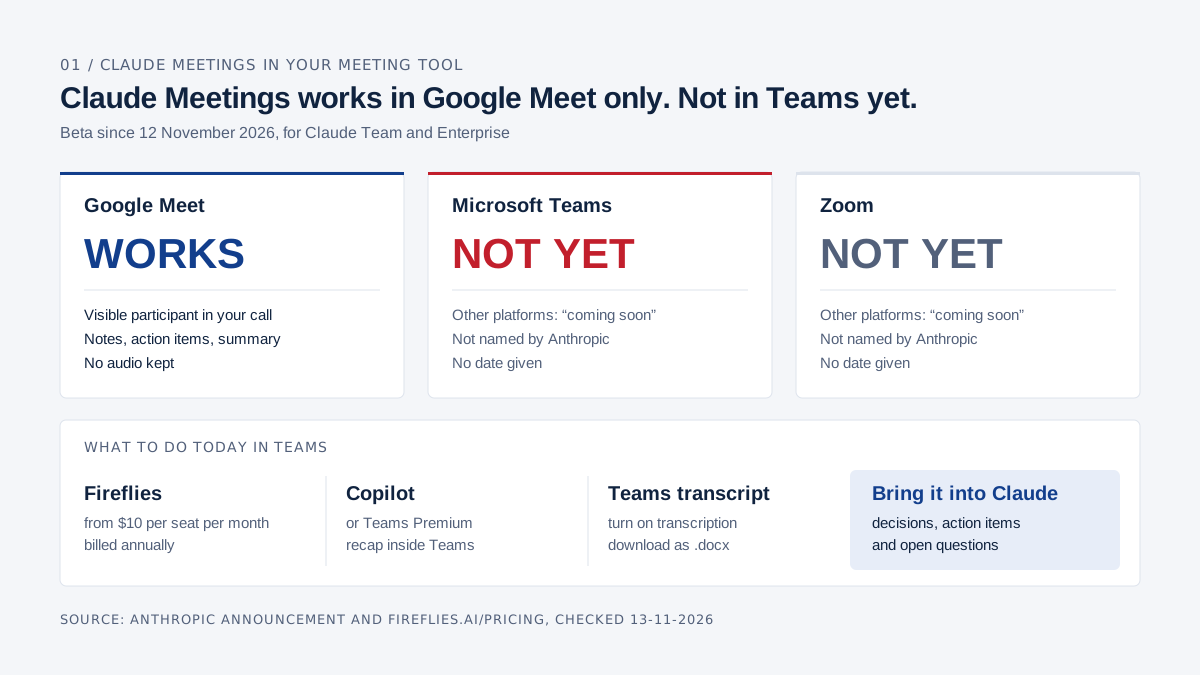
Not if your meetings run in Microsoft Teams: on 13 November 2026, Claude Meetings works in Google Meet only. Anthropic launched Claude Meetings on 12 November 2026 as a beta for Claude Team and Enterprise. Claude joins the call as a visible participant, writes notes, action items and a summary, and keeps no audio. Anthropic says other platforms are "coming soon" without naming Teams or Zoom. Until Teams is supported, keep Fireflies, Copilot or Teams' own transcript, and bring that transcript into Claude. Source: Anthropic's announcement, checked 13 November 2026.
My first reaction to the launch was that anyone paying for Fireflies in Teams could cancel it. For Teams that is premature; for Google Meet it holds, within the limits of a beta.
Fireflies already runs in Teams, Zoom and Google Meet and has its own Claude connector. Copilot and Teams Premium produce an AI recap inside Teams. So a leadership team that meets in Teams has three working routes today, and Claude can read the transcript in all three.
How Claude and Microsoft 365 compare more broadly is in Claude vs Microsoft 365. For Copilot's full price list, see what Microsoft 365 Copilot costs.
What is Claude Meetings?
Claude Meetings is a Claude feature that puts Claude into your video call as a participant: it listens, answers questions, builds documents with you and writes the notes, action items and summary. After the call everything sits on a meeting page in claude.ai.
| Claude Meetings, as of 13 November 2026 | |
|---|---|
| Status | Beta, announced 12 November 2026 |
| Plans | Claude Team and Enterprise; Pro and Max are not mentioned |
| Platforms | Google Meet only; other platforms "coming soon" |
| Calendar | Google Calendar, which an owner of your Claude organisation enables first |
| What it keeps | Transcript, summary and descriptions of shared screens; no audio |
| Beta pricing | Notes and transcripts at no extra cost; docs and whiteboards made in a call free through 10 February 2027 |
| Not available to | Organisations with zero data retention (ZDR), a HIPAA-ready configuration or customer-managed encryption keys (CMEK) |
Sources: the announcement and the help article Use Claude Meetings, checked 13 November 2026.
Claude also works during the call. In a budget review you can ask Claude to lay out three investment scenarios on a whiteboard, and your finance lead edits it while the call is still running. How Claude's whiteboards compare with Miro is covered in Claude Whiteboards vs Miro.
How does Claude Meetings work, step by step?
You connect Google Calendar, add Claude to a Meet call, and afterwards find the notes, transcript and anything Claude built on the meeting page. This is the flow in Anthropic's help article.
- Connect Google Calendar. Open Meetings in Claude and connect your Google Calendar. An owner has to enable Google Calendar for the organisation first.
- Add Claude. Pick a meeting and select "Add Claude", or turn on auto-join under Settings > Capabilities > Meetings, for all meetings or all except one-on-ones. Owners cannot switch auto-join on for you.
- Claude joins. It appears as a participant and posts a notice in the call chat with a link to the meeting page. If the host declines to admit it, Claude does not try again for that call.
- Ask during the call. Say "Claude" or type in the Meet chat. Answers arrive in writing in that chat, which everyone on the call can read. Before Claude uses one of your connected tools, such as posting to Slack, it asks your permission once; the approval then carries forward.
- Build things together. Anyone on the team can ask for a doc, whiteboard or slides. Invited colleagues edit them during the call, and each one is attached to the meeting page.
- Pause or remove it. Ask Claude to stop listening or pause it from the meeting page; ask it to leave or select "Remove Claude". It can stay up to eight hours and warns you before it leaves.
- Ask for a recap. Before the call ends, someone asks Claude to share a recap with the team.
- Read the meeting page. It holds the notes (summary and action items), the transcript and every artifact. Colleagues from your organisation who were on the invite get a recap email with the link.
Afterwards, in a normal chat, you can ask Claude about past meetings you have access to, for example which actions on a customer proposal are still open across the last three sales calls.
What does Claude Meetings keep, and who can see it?
Claude Meetings keeps a transcript, a summary and descriptions of what was shown on screen, and no audio. Both the announcement and the help article say so.
Colleagues from your organisation who were on the invite can read the notes, edit what Claude made and share the page inside the organisation. Anything Claude posts in the Meet chat is visible to everyone on the call; the chat on the meeting page stays internal.
The help article gives no retention period and describes no transcript export. For Team and Enterprise, Anthropic's pricing page says there is no model training on your content by default.
If a sensitive HR item is on the leadership agenda, pause Claude for that item. Otherwise it lands in a transcript everyone on the invite can open.
What happens when a client joins the call?
That depends on your plan and settings. On Enterprise, Claude stays out of calls with external guests by default; on Team, the help article says it may join them by default unless an owner turns that off.
The announcement puts it more broadly: by default Claude stays out when someone from outside is invited. The help article sets the default per plan, and each user also has a personal setting for meetings with external guests.
| Situation | What Claude does |
|---|---|
| External guests not allowed | Claude stays out, and leaves if an outsider joins partway through, including another company's notetaker bot |
| External guests allowed | Claude takes notes and posts its notice in chat but does not reply there. Guests' remarks appear in notes and transcript; guests get neither the meeting page nor the recap email |
| Default on Team | Allowed; an owner can turn it off |
| Default on Enterprise | Internal meetings only; an owner has to allow external guests |
Before a pricing call with a prospect on Google Meet, check how that setting is configured for you.
What does Claude Meetings cost?
During the beta, notes, transcripts and most answers cost nothing on top of a Team or Enterprise seat. Anthropic has not said what happens to pricing after the beta.
| Item | Price, checked 13 November 2026 | Source |
|---|---|---|
| Notes and transcripts | Included on Team and Enterprise during the beta | announcement |
| Answers during the call | Included, unless an answer uses a connected tool; that counts toward your usage | help article |
| Docs, whiteboards and other artifacts made in a call | Free through 10 February 2027 | announcement |
| Claude Team, standard seat | $20 per month billed annually, $25 monthly (€18 and €21.04 in the Netherlands); 2 to 150 seats | claude.com/pricing |
| Claude Enterprise | $20 per seat per month plus usage at API rates; 20-seat minimum | claude.com/pricing |
Prices exclude tax. What else the plans include is in Claude for business.
Does Claude Meetings work in Microsoft Teams or Zoom?
No. On 13 November 2026 Claude Meetings works in Google Meet only, and Anthropic gives no date for other platforms.
The help article covers Google Meet and Google Calendar and nothing else; Teams, Zoom and Outlook do not appear. If your company schedules in Outlook and meets in Teams, Claude Meetings does nothing for you yet, even with Claude Team in place.
Fireflies: what does it do and what does it cost?
Fireflies is a notetaker that joins Zoom, Google Meet and Teams calls as a bot, then transcribes, summarises and pulls out action items. Paid plans start at $10 per seat per month, billed annually.
| Plan | Annual billing | Monthly billing | What you get |
|---|---|---|---|
| Free | $0 | $0 | Transcription, limited summaries, 400 minutes of storage per team |
| Pro | $10 | $18 | Unlimited summaries, 8,000 minutes of storage per seat, video recording, downloads, action items |
| Business | $19 | $29 | Unlimited storage, multi-language mode, conversation intelligence |
| Enterprise | $39 | annual only | SSO, audit logs, custom data retention, a transcript-and-summary-only mode |
Source: fireflies.ai/pricing, per seat per month, checked 13 November 2026.
Fireflies lists Dutch and Flemish among its supported languages, and its pricing page states that it does not use meeting data to train AI models. You decide when the bot joins: per Fireflies' guide, all meetings with a web-conference link, only meetings you own, only meetings with teammates, or only when you invite fred@fireflies.ai.
There is an official Fireflies connector for Claude, built by Fireflies and marked "Anthropic verified". It lets Claude search your Fireflies transcripts and fetch a full one. Fireflies says you need a paid Claude plan.
Fireflies is also on Anthropic's partner list for Claude Meetings, alongside Gong, Attention, Granola, Otter and Plaud. Anthropic says you will soon be able to send a meeting transcript to tools like these; on 13 November 2026 you cannot yet.
When can Claude Meetings replace a Fireflies licence?
Claude Meetings can replace Fireflies when all of the following are true. For a Teams shop, the first one rules it out for now.
- You meet in Google Meet. Teams and Zoom are not supported yet.
- You already pay for Claude Team or Enterprise. Notes and transcripts then come with the seat during the beta.
- You never replay a call. Claude keeps no audio; Fireflies keeps a recording.
- You do not use conversation analytics. Talk-time and topic tracking sit in Fireflies Business, not in Claude Meetings.
- Your organisation is not on ZDR, HIPAA or CMEK. Those are excluded during the beta.
- You can live with the open questions. Retention, export, supported languages and post-beta pricing are not documented yet. I have not been able to test how well it transcribes a meeting held in Dutch.
Copilot in Teams, and the recap Teams gives you for free
Teams records and transcribes without any extra licence, Dutch included. AI notes and suggested tasks need Teams Premium or a Copilot licence.
Without an add-on, Microsoft says, every participant sees a notice when transcription starts, and Dutch (Netherlands and Belgium) is among the spoken languages. Organisers and co-organisers can download the transcript as .docx or .vtt by default. The Recap tab shows the recording, transcript, shared files and notes (Microsoft).
With Teams Premium or Copilot you get intelligent recap: AI notes, suggested tasks, speaker markers and chapters. Microsoft Learn (updated 15 October 2026) lists a Teams Premium or Copilot licence as the requirement, with transcription switched on. With Copilot, scheduled meetings can get a recap without Teams saving the transcript.
| Microsoft 365 Copilot Business (add-on), per user per month | Annual billing | Monthly billing | Source |
|---|---|---|---|
| United States | $18 promotional, $21 regular | $25.20 | microsoft.com/en-us |
| Netherlands | €15.60 promotional, €18.20 regular | €21.84 | microsoft.com/nl-nl |
Checked 13 November 2026, excluding tax. Copilot Business sits on top of a Microsoft 365 plan with Teams; in the Netherlands, Business Basic is €6.07 per user per month. Microsoft's footnote says the promotion runs from 1 July to 31 December 2026, for the first year only. Teams Premium is a separate add-on whose price I could not confirm on microsoft.com on that date.
For a ten-person leadership team, Copilot Business is $2,160 in the first year at the promotional price and $2,520 a year after that, on top of Microsoft 365. Fireflies Pro for the same ten people is $1,200 a year, Business $2,280. Ten Claude Team seats are $2,400 a year; they buy far more than meeting notes, but in Teams they buy no meeting notes yet.
Claude Meetings, Fireflies and Copilot side by side
Fireflies is the only one of the three that works across Teams, Zoom and Google Meet on 13 November 2026; Claude Meetings covers Google Meet and Copilot covers Teams.
| Claude Meetings | Fireflies | Copilot in Teams | Teams, no add-on | |
|---|---|---|---|---|
| Platforms | Google Meet | Zoom, Google Meet, Teams and more | Teams | Teams |
| Status | Beta | Available | Available | Available |
| What is kept | Transcript, summary, screen descriptions; no audio | Transcript, summary, recording | Recording and transcript in OneDrive or SharePoint, plus the recap | Recording and transcript, if someone turns them on |
| Who sees it | Colleagues on the invite | Whoever you give access in Fireflies | Participants, in the Recap tab | Participants; downloads by organisers by default |
| External guests | On by default on Team, off on Enterprise | Set through auto-join options | Yes; recap shareable via Outlook | Yes; everyone sees the notice |
| Price | Inside Team and Enterprise; free during the beta | $0 to $39 per seat | $18 to $21 on top of Microsoft 365, or Teams Premium | Included with Microsoft 365 plans that have Teams |
| Dutch | No languages listed | Yes | Teams transcribes Dutch | Yes |
| Action items | Yes | Yes, from Pro | Yes, suggested tasks | No |
| Link to Claude | Built in | Fireflies connector | Microsoft 365 connector | Microsoft 365 connector or upload |
Sources: Anthropic, Claude help article, fireflies.ai/pricing, Microsoft Learn, Microsoft on transcription and Claude's Microsoft 365 connector, checked 13 November 2026.
Do you have to tell people an AI is listening?
Yes. Anthropic's own instruction is to make sure everyone on your calls is fine with being transcribed before you add Claude or turn on auto-join.
In practice that means a line in the invite, such as "Claude will take notes and a transcript; no audio is recorded", and saying it again when the call starts. If someone objects, pause Claude or remove it. The chat notice Claude posts does not replace that explanation, least of all for a client who has never seen Claude.
Under the GDPR you have a duty to inform people about what you do with their personal data, and a meeting transcript is personal data. The Dutch data protection authority explains what that duty covers in Right to information: purpose, who receives the data and how long you keep it, among other things. This is not legal advice; take doubts to your privacy counsel or data protection officer.
What to do today if you meet in Teams
Keep the notetaker you have, start pulling its transcripts into Claude now, and look again when Anthropic adds Teams to the Claude Meetings help article.
| Your situation | What to do today |
|---|---|
| You use Fireflies in Teams | Keep it. Connect the Fireflies connector to Claude and ask questions across meetings. |
| You have Copilot or Teams Premium | Use the recap in Teams and connect Claude's Microsoft 365 connector so Claude reads the meeting information too. |
| You have neither | Turn on transcription in Teams, download the transcript as .docx and give it to Claude. |
| You run on Google Workspace and Meet | Run Claude Meetings next to Fireflies for a few weeks, then decide on Fireflies. |
With the Microsoft 365 connector, Claude can review Teams meeting information, summaries and attendance, and the permission list includes reading meeting transcripts. A Microsoft Entra Global Administrator has to approve the connector first, and Claude only sees what your own Microsoft account can see.
If you load transcripts by hand, give Claude the same instruction every time: "From this leadership-meeting transcript, list the decisions, the action items with owner and deadline, and the questions left open." You then get the same list after every meeting and can see at the next one what is still open.
Look again when Teams appears in the help article, before your Fireflies or Copilot annual term renews, and around 10 February 2027, the date until which Anthropic calls docs and whiteboards made in calls free.
If your Fireflies annual plan is up now and you meet in Teams, I would renew monthly until Teams is in that help article. It costs more: Fireflies Pro is $18 per seat monthly against $10 on an annual plan.
If you are weighing Copilot, Fireflies and Claude Team against each other, we put your current licences and your meeting pattern side by side and help you bring Claude into your organisation.
Frequently asked questions
Does Claude Meetings work in Microsoft Teams?
No. On 13 November 2026 it works in Google Meet only. Anthropic says other platforms are "coming soon" but does not name Teams or Zoom and gives no date.
Is Claude Meetings free?
During the beta, notes and transcripts are included in Claude Team and Enterprise, and docs and whiteboards made in calls are free through 10 February 2027. You still need a Team seat, from $20 per month billed annually, or Enterprise.
Can I use Claude Meetings on Claude Pro or Max?
Anthropic only mentions Team and Enterprise. Organisations with zero data retention, a HIPAA-ready setup or customer-managed encryption keys are also excluded during the beta.
Does Claude Meetings record audio?
No. It keeps a transcript, a summary and descriptions of shared screens. Fireflies, by contrast, keeps a recording.
Can I connect Fireflies to Claude?
Yes, through the Fireflies connector in Claude's connector directory, built by Fireflies. Claude can then search your Fireflies transcripts. Fireflies lists a paid Claude plan as a requirement.
Do I need to tell participants that Claude is listening?
Yes. Anthropic itself says everyone should be comfortable being transcribed before you add Claude. Put it in the invite, say it at the start, and check your GDPR duty to inform, for example via the Dutch data protection authority.
AI Board is your personal AI assistant that makes you AI-native: it runs on your own laptop, grounded in your company's data, and gets sharper as your knowledge grows. Private by design, reasoning at CEO, CFO and CTO level, so you ride the AI wave instead of swimming behind it.