By Jordi Daniëls, founder of AI Board ·
Yes, if your team already pays for Claude Team and uses Miro mainly for internal brainstorms, planning sessions and retros. Claude Whiteboards covers that work. Keep Miro if you run workshops with dozens of outside participants, rely on a template library or draw formal process models. Whiteboards has been in beta on every paid Claude plan since 10 November 2026, and Anthropic built its own export to Miro. All facts and prices checked on 13 November 2026.
When Anthropic announced Whiteboards on 10 November, my first reaction was that it beats Miro and that the Miro seats could go. I then held that claim against what Anthropic and Miro publish themselves, and against a test of our own in Claude. It survives for a leadership team thinking out loud. It does not survive for a facilitator who runs client sessions every week.
When you audit your software costs, Miro is often the next per-seat licence on the list after the Microsoft ones covered in Claude vs Microsoft 365.
AI Board runs on Claude. Every claim below links to Anthropic or miro.com, or comes from our own test.
What is Claude Whiteboards?
Claude Whiteboards is a shared board inside Claude where you, your colleagues and Claude work out a plan together. According to Anthropic's help article, you talk, type or sketch, and Claude turns that into shapes, arrows and sections that anyone on the board can move around.
| Claude Whiteboards | |
|---|---|
| Status | Beta since 10 November 2026 |
| Plans | Pro, Max, Ultra, Team and Enterprise; not Free |
| Default | On for Team, off for Enterprise; admins change it under Organization settings > Artifacts |
| Where | Web, desktop app and mobile app |
| Cost | Included in your paid plan; counts towards your plan's usage limits |
| Claude Team standard seat | $20 per month billed annually, $25 billed monthly |
Sources: the announcement, the Whiteboards help article and claude.com/pricing, checked 13 November 2026, excluding tax.
What does a working session look like?
You talk through a plan and Claude builds a board from it, with a timeline, owners and dates. Take a Monday leadership meeting about the new product line launching in spring. Someone describes the work out loud: supplier contracts, pricing, the sales kit, the launch event.
- Open a board. Ask for a whiteboard in any chat, or pick the Whiteboard tile in the Artifacts tab.
- Say the plan. Claude groups related ideas, puts steps in order and links the ones that depend on each other. Dictation runs from the microphone button and follows your browser's language.
- Bring the team in. Everyone on the board works live and can rearrange what is there. You can follow a colleague around the board to see what they are looking at.
- Let Claude sort the notes. Anthropic's own example is a retro: everyone adds notes, and Claude groups them by theme and drafts action items for each person.
- Ask about one corner. Drag across part of the board and ask Claude about that section only, say the pricing work. You can also ask what is missing between two steps, and Claude adds suggestions for you to accept or delete.
- Move it on. When the thinking is done, Claude turns the board into a doc or a deck. The Share panel has an Export tab with a PNG download and the routes to Miro, Vani and Lucid.
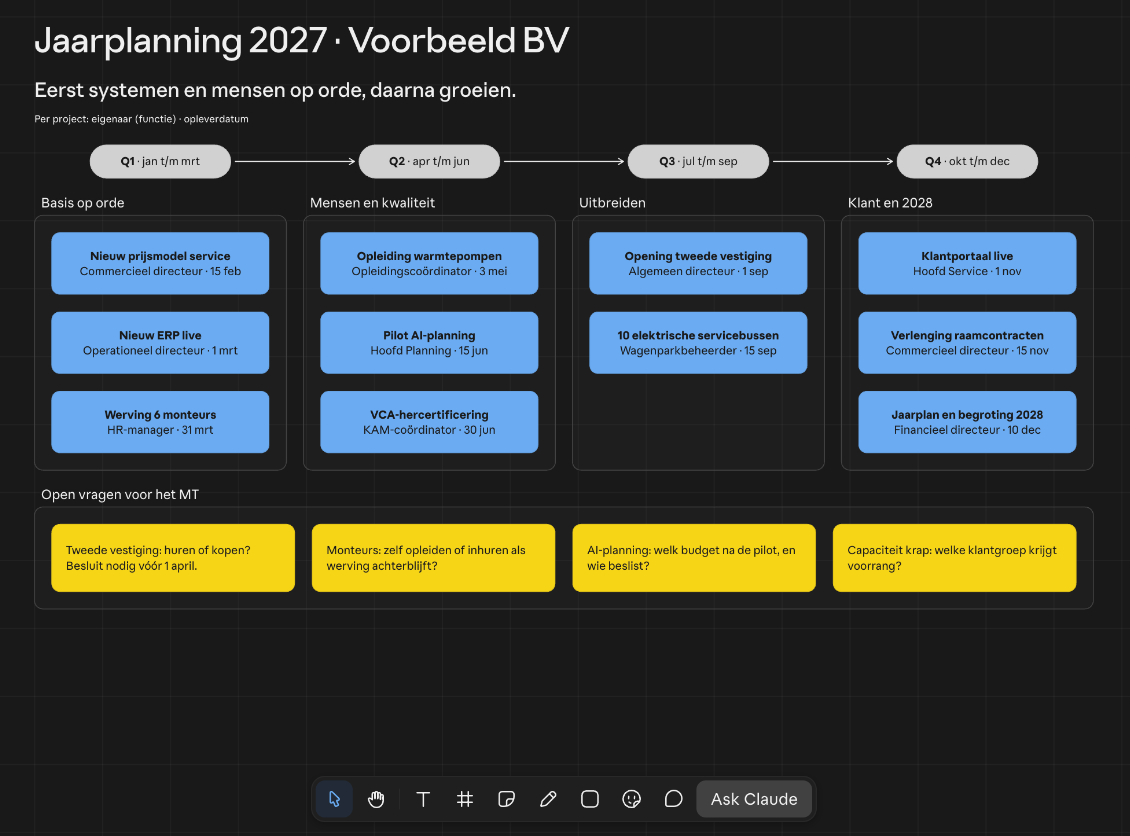
Screenshot from Claude, 13 November 2026. Voorbeeld BV and its figures are fictional.
In our own test on 13 November, on an Ultra account, a single prompt gave us an annual plan in about three minutes. The board had a Q1 to Q4 timeline, four columns holding eleven project cards, each with an owner by job title and a date, plus a row of yellow cards listing open questions for the leadership team. The toolbar along the bottom offers select, a hand for panning, text, grid, note, pen, shape, stickers and emoji, comments and Ask Claude.
Boards are saved in the Artifacts tab, and each board's menu has Duplicate, Rename, Permissions and Storage. How Claude's own docs and decks compare with Word and PowerPoint is covered in Claude Docs vs Word and Claude Slides vs PowerPoint.
What can't Claude Whiteboards do yet?
Claude Whiteboards cannot import boards yet, has no template library, no timer or voting, and only lets outsiders in with a Claude account. The help article names some of these limits; the rest were missing in our test.
- Claude only sees the board. It does not pull context from your connected apps, so your project tool or CRM stays out of the picture.
- No import. You cannot import a board from a file, so your existing Miro boards stay in Miro. Export what you want to keep before you cancel.
- No template library. You can copy one of your own boards with Duplicate in the board's menu, but neither the announcement nor the help article mentions a library of ready-made templates.
- No timer or voting. The toolbar in our test had no timer, voting button or private mode, and the announcement and help article do not mention them either.
- Outsiders need a Claude account. You invite people outside your organisation by email, and on Team and Enterprise the setting Email invitations outside your organization has to be on. Anthropic's sharing article says each invitee needs a Claude account on that email address and caps outside invitees at 50 per artifact. That article covers artifacts in general and does not name Whiteboards.
- Not for every organisation. Organisations with a HIPAA-ready configuration do not get Whiteboards, and where an organisation has zero data retention for Claude Code, Whiteboards is not covered by it.
What does Miro do, and what does it cost?
Miro is an online whiteboard built around what Miro itself calls an infinite canvas, with more than 7,000 templates and more than 250 integrations, and a paid seat costs $8 to $25 per member per month. Miro AI runs on that canvas: sidekicks are AI agents that know the context of your board, and flows are multi-step AI workflows your team can save and reuse as templates.
| Plan | Billed annually | Billed monthly | What you get |
|---|---|---|---|
| Free | $0 | $0 | 3 editable boards, 10 AI credits a month to try Miro AI |
| Starter | $8 | $10 | Unlimited boards; visitors can edit a public board without signing in; timer, voting and private mode; 25 AI credits per member per month |
| Business | $20 | $25 | Everything in Starter, plus free guests, Engage activities for up to 50 participants, SAML SSO, 50 AI credits per member per month and 3,900+ diagramming shapes and icons |
| Enterprise | custom | custom | From 30 members; pooled AI credits starting at 2,500 a month; SCIM |
Per member per month, excluding tax. Sources: miro.com/pricing for annual prices and features, Miro's process mapping page and Business plan page for the monthly prices, checked 13 November 2026.
Only members pay. Guests on Business get a free Miro account and do not take up a paid seat. Visitors need no account at all.
Invoices are annual. If you pay by invoice, Miro asks for at least 10 licences on Starter or 5 on Business. Card payments can be monthly or annual with no minimum.
For running a workshop, Miro has tools we did not find in Whiteboards. Starter adds a timer, voting and private mode. Business adds Engage activities such as polls, scales and a 2x2 matrix for up to 50 participants.
Anthropic sends your board to Miro
Claude Whiteboards and Miro are rivals and partners at once: Anthropic built an export that sends your board to Miro, and Miro built a connector that lets Claude work inside Miro boards.
Anthropic's announcement says that once the brainstorm is done you can move a board into tools such as Lucid, Miro or Vani by Zoho and keep working on it with your team there. In the help article that route is called Send to, and Anthropic says more destinations are coming. In our test it sat under Share, on the Export tab. From there you turn the board into Claude Slides, Claude Design or something else, download it as a PNG, or pick More formats and apps.
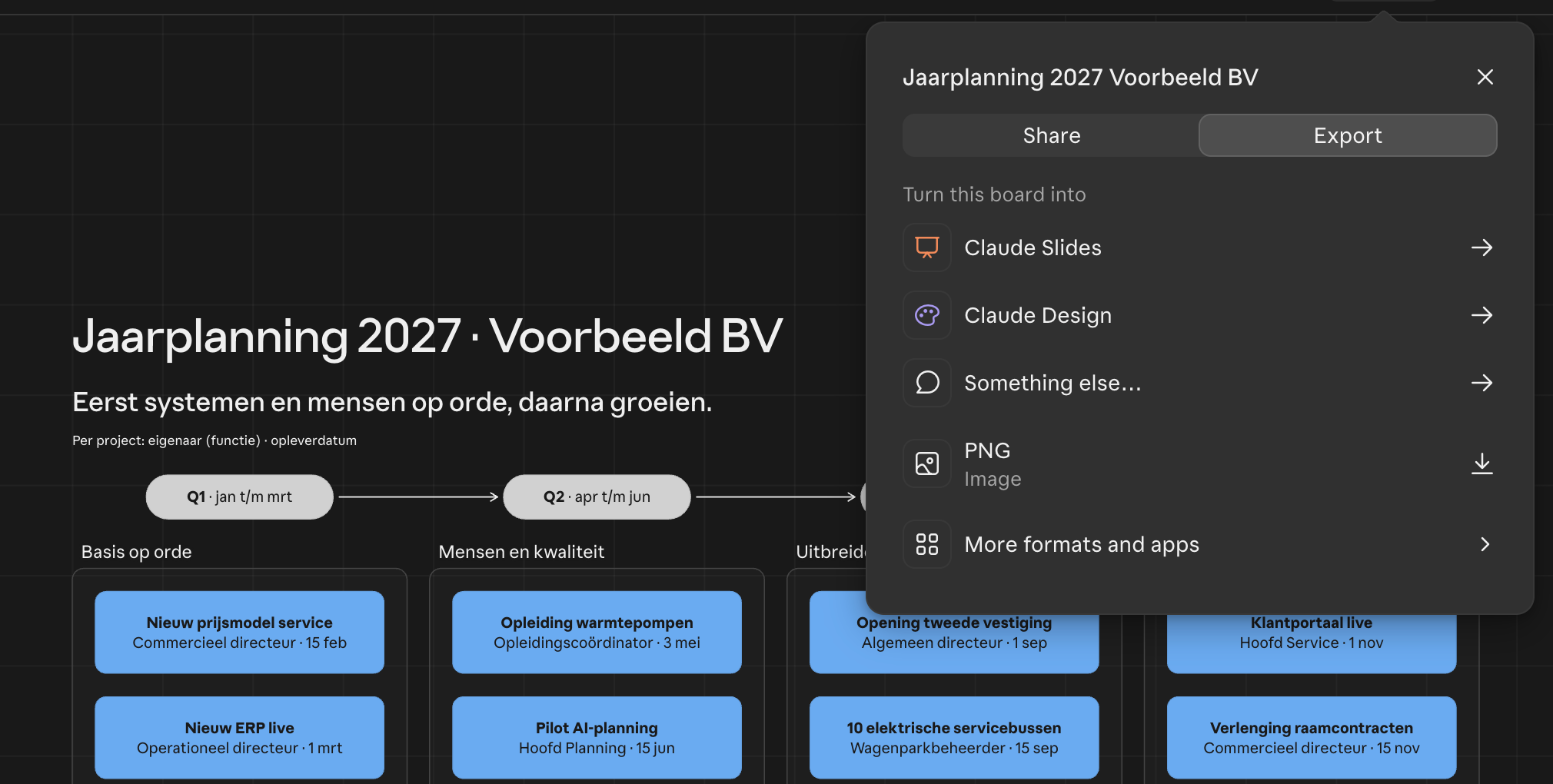
Screenshot from Claude, 13 November 2026.
More formats and apps lists Miro, Vani and Lucid, each with a Connect button. You link your Miro account first, and only then can a board go across.
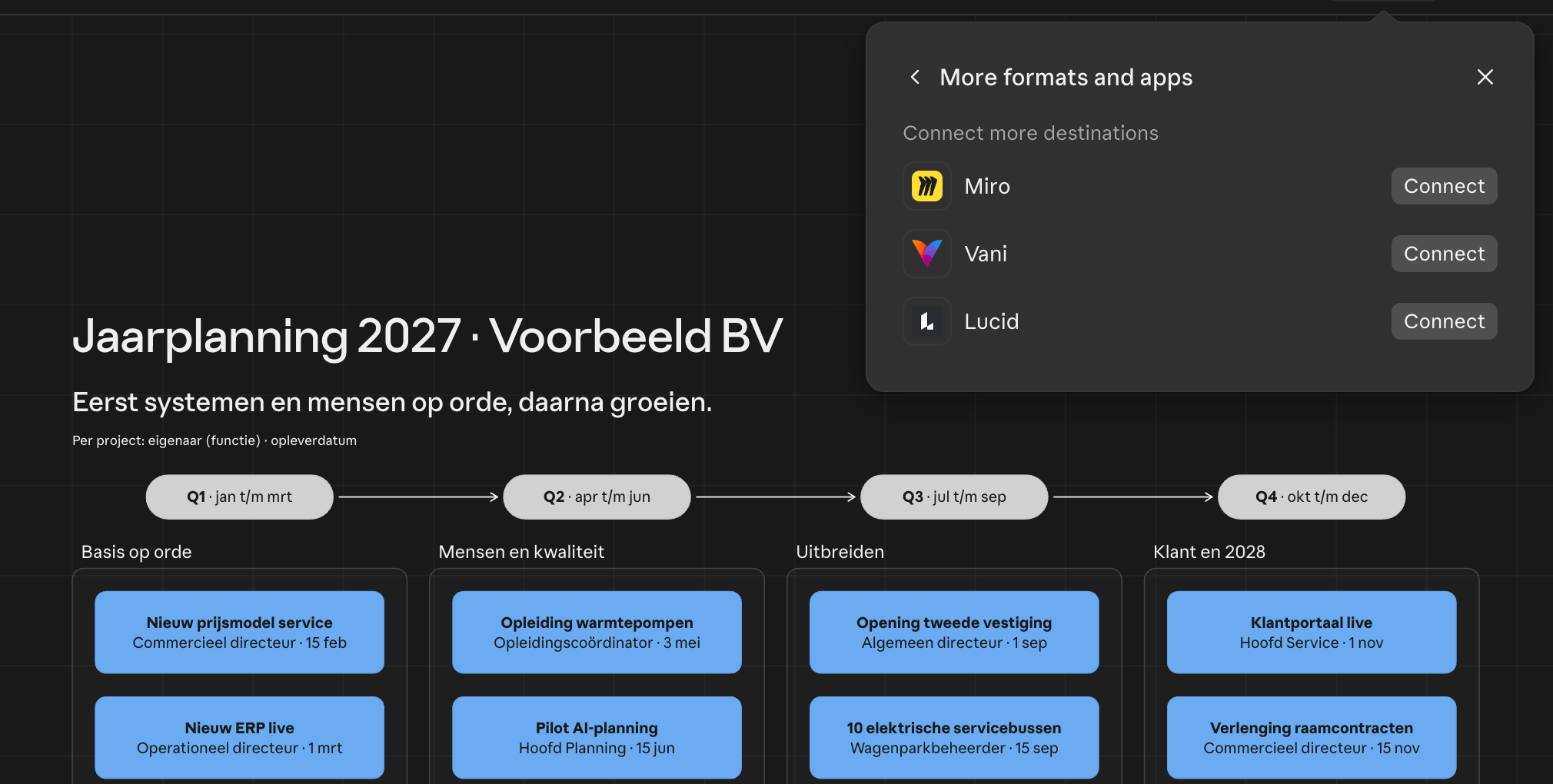
Screenshot from Claude, 13 November 2026.
It works the other way round too. Miro's MCP server lets you add Miro from Claude's connector directory. Claude can then summarise and search Miro boards, build boards and generate diagrams, within the permissions you already have in Miro. Miro's pricing page says the connection works on every Miro plan, with a different daily cap on calls per plan.
So leadership can think in Whiteboards and send the board to Miro once someone turns it into a client session.
Claude Whiteboards vs Miro, task by task
Whiteboards wins when your own team is doing the thinking; Miro wins once outsiders, templates or formal diagrams come in.
| Task | Claude Whiteboards | Miro | My pick |
|---|---|---|---|
| Leadership brainstorm | Talk, type or sketch; Claude groups by theme and, when asked, fills gaps | Notes with timer, voting and private mode from Starter; Miro AI on credits | Whiteboards |
| Annual plan | In our test, one prompt gave a timeline with project cards, owners and dates in about three minutes; then a doc or deck | Planning on the canvas; on Business, linked to Jira, Asana, Linear, ClickUp and Azure | Whiteboards for the plan, Miro if it has to stay synced with your project tool |
| Client workshop with 30 outside participants | Email invitations; every participant needs a Claude account; up to 50 outsiders per artifact; no timer or voting | Visitors without an account on Starter, free guests on Business, Engage for up to 50 participants | Miro |
| Drawing a process flow | Shapes, arrows and sections; Claude orders steps and links dependencies | 3,900+ shapes and icons on Business, shape packs for flowcharts, BPMN and value stream mapping | Whiteboards for a sketch, Miro for a formal process model |
| Project retro | Everyone adds notes; Claude groups them by theme and drafts actions per person | Timer, voting and private mode from Starter | Whiteboards, unless you want to vote on the actions |
| Reusing a template | No template library; copy your own board with Duplicate; no import from a file | 7,000+ Miro and community templates; flows saved as templates | Miro, unless you only reuse last year's board |
Sources: announcement, Whiteboards help, sharing help, miro.com/pricing, Miro process mapping, Miro AI and our own test, checked 13 November 2026.
The client workshop decides it for agencies and consultants. On Miro Starter you share a public board and visitors edit it without signing in. On Claude, each of your thirty participants needs a Claude account on the address you invited, and Claude will not tell you whether that account exists yet. The help article does not say whether a free account is enough. On Enterprise, both Whiteboards and outside email invitations start switched off.
The annual plan runs the other way. Your leadership team spends an hour on the budget and the milestones, Claude lays it out on a timeline with owners, and you end the meeting with a document for the board of directors. Miro's sidekicks can also build timelines on the canvas, paid for from your plan's AI credits. If the plan then has to be updated every week from Jira or Asana, Miro is the better home, because Whiteboards does not read your connected apps.
How much do you save by cancelling Miro?
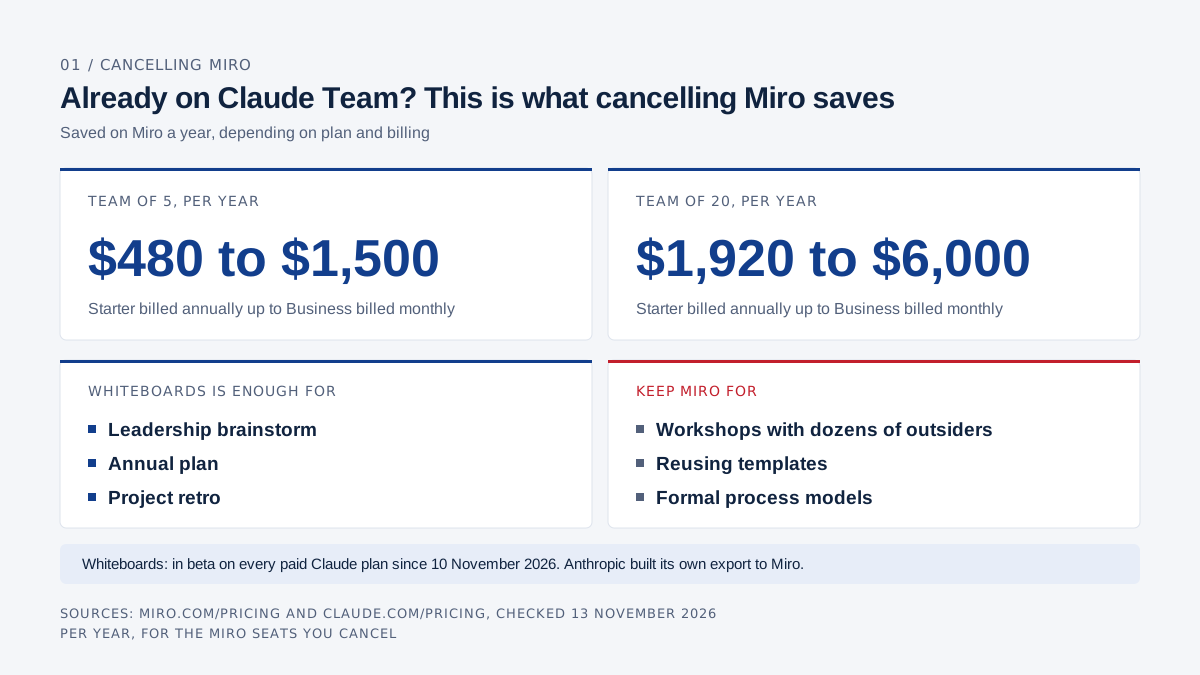
A five-person team saves $480 to $1,500 a year on Miro, a twenty-person team $1,920 to $6,000, depending on plan and billing. That only counts as a saving if you already pay for Claude Team, because a Claude Team standard seat costs exactly as much as a Miro Business seat.
| Licence | Per seat per month | Team of 5, per year | Team of 20, per year |
|---|---|---|---|
| Miro Starter, billed annually | $8 | $480 | $1,920 |
| Miro Starter, billed monthly | $10 | $600 | $2,400 |
| Miro Business, billed annually | $20 | $1,200 | $4,800 |
| Miro Business, billed monthly | $25 | $1,500 | $6,000 |
| Claude Team standard seat, billed annually | $20 | $1,200 | $4,800 |
| Claude Team standard seat, billed monthly | $25 | $1,500 | $6,000 |
Sources: miro.com/pricing, Miro process mapping and claude.com/pricing, checked 13 November 2026, excluding tax.
If you already have Claude Team, every Miro seat you cancel is money back: $480 a year for five people on Starter billed annually, up to $6,000 for twenty people on Business billed monthly.
If you don't have Claude Team yet, Whiteboards on its own is no reason to switch. Five Claude Team seats cost $1,200 a year against $480 for five Miro Starter seats. You buy Claude Team for the whole package: chat, Docs, Slides, Sheets and Whiteboards together. Plan prices are in Claude for business, and how they stack up against your Microsoft licences in Claude vs Microsoft 365.
You can also keep a few Miro seats. A twenty-person team that keeps two Business seats for the people who run client workshops pays $480 a year instead of $4,800. Clients join those workshops as guests and take no paid seat. That works on a card; on invoice Miro asks for at least 5 Business licences.
When is Whiteboards enough, and when do you keep Miro?
Whiteboards is enough when your team works internally, already has Claude Team and opens Miro mostly for brainstorms, planning and retros. Miro stays when you work with outsiders, run on templates or draw formal process models.
Whiteboards is enough if:
- Miro mostly comes out at leadership meetings, the annual offsite and project retros;
- everyone taking part already has a Claude seat;
- the board has to end up as a doc or deck, such as the annual plan for your shareholders;
- you don't need a template library or BPMN diagrams.
Keep Miro if:
- you run workshops with clients, suppliers or anyone else without a Claude account;
- you work with a timer, voting rounds or Engage activities;
- your planning is tied to Jira, Asana or another project tool;
- your team runs on its own templates or draws formal process models;
- you are on Claude Enterprise and your admin has not switched Whiteboards on.
So my claim holds for the thinking a team does in-house. For a five-person leadership team that opens Miro mostly for quarterly planning and retros, I would cancel the Miro seats at the next renewal once Claude Team is in place. For an agency running client sessions every week, Whiteboards does not beat Miro yet, and Anthropic does not pretend it does, since the export to Miro is built in.
Whiteboards was three days old on the date I checked. Run a few real sessions first, such as your next retro and your quarterly review, before you cancel anything.
AI Board helps leadership teams with this call: which licences to keep, which to drop and how to roll Claude out across the organisation. If Copilot is part of the decision, read what Microsoft 365 Copilot costs.
Frequently asked questions
Is Claude Whiteboards free?
No. Whiteboards is part of the paid plans Pro, Max, Ultra, Team and Enterprise, not Free. There is no separate price; usage counts towards your plan's limits. Pro costs $17 a month billed annually and a Team standard seat $20, according to claude.com/pricing on 13 November 2026.
Can I import my Miro boards into Claude Whiteboards?
No. According to the help article you cannot import a board from a file. The other direction works: under Share and Export you send a Claude board to Miro, Lucid or Zoho Vani once you have linked that account with Connect. With the Miro connector, Claude can summarise and search an existing Miro board.
Can clients join a board without a Claude account?
No. You invite people outside your organisation by email, and each of them needs a Claude account on that address. You can invite up to 50 outsiders per artifact, per Anthropic's sharing article. In Miro, visitors on Starter can edit a public board without signing in.
Is Whiteboards switched on in Claude Enterprise?
Not by default. On Enterprise an admin switches Whiteboards on under Organization settings > Artifacts. On Team it is on by default, as are email invitations to people outside your organisation.
What does Miro cost per user?
Miro Starter is $8 per member per month billed annually or $10 billed monthly, Business $20 or $25. Enterprise is priced on request and starts at 30 members. Prices exclude tax, per miro.com/pricing and Miro's Business plan page on 13 November 2026.
AI Board is your personal AI assistant that makes you AI-native: it runs on your own laptop, grounded in your company's data, and gets sharper as your knowledge grows. Private by design, reasoning at CEO, CFO and CTO level, so you ride the AI wave instead of swimming behind it.