By Jordi Daniëls, founder of AI Board ·
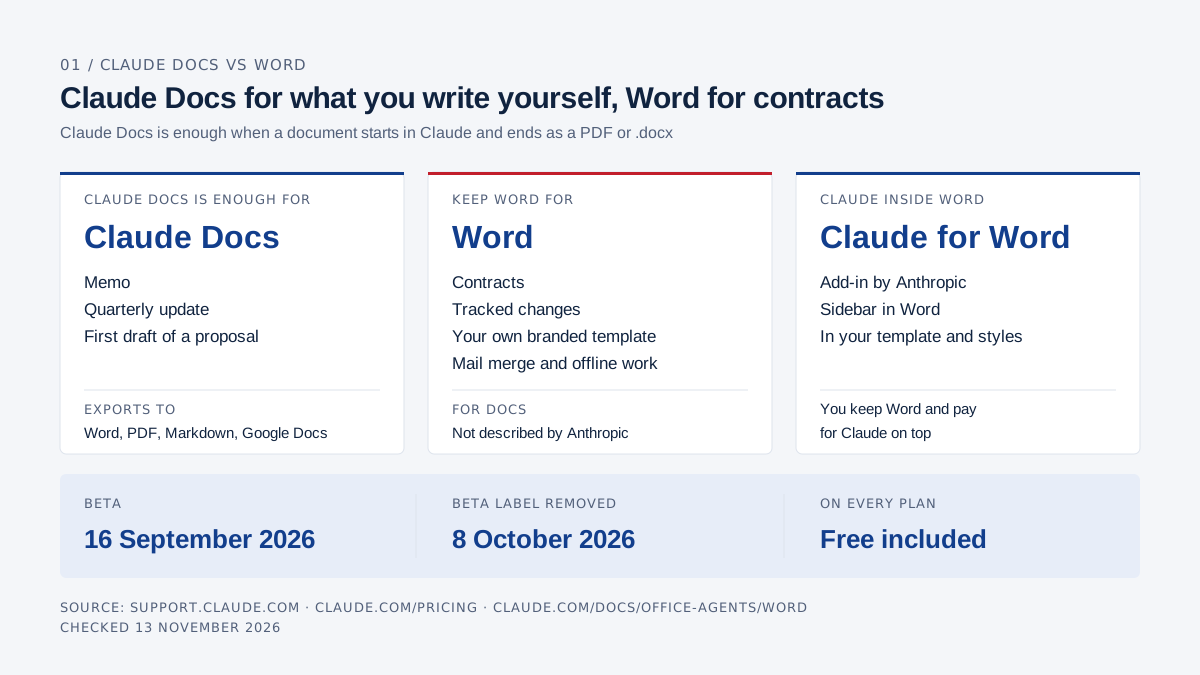
Claude Docs is enough for documents you write with Claude, share inside the company and send out as a PDF or Word file: a memo, a quarterly update, the first draft of a proposal. Keep Word for contracts with tracked changes, your own branded template, mail merge and working offline. Anthropic launched Claude Docs in beta on 16 September 2026 and removed the beta label on 8 October 2026, when Docs became available on every Claude plan, Free included. A doc exports to Word, PDF, Markdown or Google Docs. If you want Claude inside Word itself, there is the Claude for Word add-in, which runs in Word, so you keep Word and pay for Claude on top. Checked 13 November 2026.
This article covers documents only: the letter, the proposal, the contract and the board paper. The wider comparison is in Claude vs Microsoft 365.
You have three routes: Claude Docs, where you write inside Claude; Word on its own or with Copilot; and Word with Claude for Word, Anthropic's add-in that runs inside Word.
AI Board runs on Claude. Every claim about Claude links to Anthropic, and every claim about Word links to Microsoft.
How does Claude Docs work?
Claude Docs is a rich-text document that Claude drafts for you in a conversation, which you then edit yourself or with Claude and share by link. Docs live in your Claude account under the Artifacts tab and can hold headings, tables and several tabs.
Anthropic's help centre describes six steps:
- Ask for a document. Describe what you need in any conversation, or start your message with
/docs. Claude asks a few questions first, then drafts the doc on screen. If the content lives in a file or a connected app, name it in your request. - Edit it yourself. Click into the doc and type. Changes save automatically, and you can also ask Claude for an edit in the conversation.
- Leave a comment for Claude. Select text, add a comment and mention
@Claude. Claude replies in the thread, makes the change and explains what it did and why. Claude also leaves its own comments while drafting, to explain a choice or ask you something. - Share by link. A doc starts private. Under "Share" you give people view, comment or edit access. Anyone arriving through a plain link signs in to Claude and can only view. Pro, Max and Ultra can also invite people by email; Free cannot. On Team and Enterprise you share with people, groups or the whole organisation, and sharing outside it needs an Owner's permission.
- Edit together. Everyone with edit access can work in the doc at the same time as you and Claude. Each change is attributed to whoever made it, a person or Claude. Claude acts with the permissions of whoever asked, and opening a shared doc requires a Claude account.
- Export. Click "Export" and pick Word (.docx), PDF, Markdown (.md) or Google Docs. Only people with edit access can export. You can also ask Claude to turn the doc into a deck; see Claude Slides vs PowerPoint.
Which plans include Claude Docs, and is it still in beta?
Claude Docs is on every Claude plan, from Free to Enterprise. Anthropic introduced it on 16 September 2026 as a beta on paid plans, and on 8 October 2026 took the beta label off Docs, Slides and Design and put them on every plan, Free included. On Enterprise, Docs has been on by default since 15 October 2026. The pricing page lists Docs on all plans as of 13 November 2026.
Docs is not yet two months old, and the help centre still lists limitations:
- Edits and comments inside a doc are not yet recorded in the Enterprise Compliance API.
- Charts in a doc don't refresh on their own; you ask Claude to pull the latest numbers.
- You can't change sharing settings in the mobile app.
- Deleting a doc is permanent, with no trash.
- If you move a personal account into a Team organisation, your docs don't move with it. Export them first.
Several things you know from Word are not described for Docs: a tracked-changes mode, opening or importing an existing .docx, using your own Word template (.dotx), and working offline. The help centre mentions a version history but does not say how to restore an older version.
You can attach a Word file to the conversation and ask Claude to write a new doc from it. Anthropic doesn't say whether the original's formatting, comments or tracked changes carry over.
How do you do the same things in Word?
In Word you do the same work in a .docx file stored in OneDrive or SharePoint, and you write it yourself or with help from Copilot or Claude for Word.
- Templates and styles. Save a document as a Word template (.dotx) and start every letter or proposal from it, with your logo, formatting and standard text in place.
- Track changes. On the Review tab, turn on Track Changes. You accept or reject changes one by one or all at once, and you can lock tracking with a password.
- Comments. @mention a colleague in a comment and they get an email. A comment can also be assigned as a task.
- Co-authoring. With the file in OneDrive or SharePoint, colleagues edit the same document at the same time. Without a Microsoft 365 subscription you don't get real-time collaboration.
- Version history. This also requires the file to be in OneDrive or SharePoint.
- Offline. In the desktop or mobile app you keep working without a connection. Desktop apps start at Business Standard ($14 per user per month in the US, €12.13 in the Netherlands); Business Basic ($7, €6.07) includes only the web and mobile versions of Word.
- Mail merge. Produce letters, emails, labels or envelopes per recipient from an Excel list or your Outlook contacts. Only the desktop app runs a merge; Word for the web cannot.
- Copilot in Word. Copilot drafts, rewrites and summarises with an eligible Microsoft 365 subscription or a Copilot licence. Copilot Business costs €18.20 per user per month in the Netherlands, with a €15.60 promotional price until 31 December 2026. US prices are in our Copilot cost breakdown.
Microsoft 365 prices are per user per month on annual billing, excluding tax, from Microsoft's US and Dutch pricing pages, checked 13 November 2026.
What is Claude for Word?
Claude for Word is an Anthropic add-in that puts Claude in a sidebar inside Word. It has been generally available since 7 May 2026 on paid Claude plans.
It works in the Word file itself, so in your own template and with your client's changes still in it. According to Anthropic's documentation it can:
- edit a selected passage while keeping the surrounding styles, numbering and formatting;
- work in tracked-changes mode, so every edit lands as a revision you accept or reject in Word;
- work through comment threads, editing the text each comment is anchored to and replying with what it changed;
- summarise a counterparty's redlines and flag the ones worth pushing back on;
- fill a template using your document's heading and paragraph styles, so new text matches your house style.
You install it from Microsoft AppSource, or your admin deploys it for the organisation. It runs in Word on the web, Word for Windows with a Microsoft 365 subscription, and Word for Mac from version 16.61. Word 2016 and 2019 on a perpetual licence, Word on iPad and Android, and legacy .doc files are not supported. For business use that means a Microsoft 365 licence plus a paid Claude plan.
What goes to Anthropic?
The content Claude reads from your document goes to Anthropic, according to Anthropic's documentation. Claude reads the open document including text, comments, tracked changes, footnotes and tables. The same page says the add-in does not inherit your organisation's custom retention settings and its activity is not included in Enterprise audit logs; Enterprise organisations using the Compliance API do get the sessions there.
Pluto Security, a security firm, tested the add-ins in May 2026. Its analysis found that Claude for Word sends the entire document body with every prompt, even for a question unrelated to the document. Pluto reported this to Anthropic, which according to Pluto considers it working as designed. Anthropic itself confirms only that the content Claude reads is sent.
Anthropic also warns to use Claude for Word with trusted documents only. A file from a counterparty can carry hidden instructions in its text, comments or tracked changes that push Claude into actions you didn't ask for. A client's contract is that kind of file, so involve your IT admin before you use the add-in for it.
Which route fits which task?
Claude Docs fits text you write from scratch and share internally; Word, with or without Claude for Word, fits as soon as a client or a template needs work done inside the .docx itself.
| Task | Claude Docs | Word (with or without Copilot) | Word with Claude for Word |
|---|---|---|---|
| Write a letter or memo | Ask for it in the conversation, steer with comments | Write it yourself or have Copilot draft it | Claude drafts in your document, in your styles |
| Draft a proposal | Content and pricing logic in Docs, then export to .docx or PDF | Start from your proposal template (.dotx) | Claude fills your proposal template in the document's styles |
| Return a client's contract with tracked changes | No tracked-changes mode and no .docx import described | Accept or reject their changes, track your own | Claude summarises the redlines and edits as tracked changes; trusted documents only |
| House-style template | Templates from Anthropic's gallery; your own .dotx not described | Your own .dotx | Works in your template and styles |
| Work with three colleagues | Edit together; everyone needs a Claude account | Co-author in OneDrive or SharePoint | Same as Word; Claude helps whoever has the add-in |
| Version history | Exists; restoring not described | Through OneDrive or SharePoint | Same as Word; Claude's edits sit in the file as revisions |
| Work offline | Not described | Desktop and mobile apps | Word works offline, Claude doesn't: every request goes to Anthropic |
| Send a file to a client who uses Word | Export to .docx or PDF | The .docx itself | The .docx itself |
| What you need | Any Claude plan, Free included | Microsoft 365; desktop apps from Business Standard ($14) | Microsoft 365 plus a paid Claude plan (Pro $17 a month billed annually) |
Sources: the Anthropic and Microsoft pages linked per feature above, plus claude.com/pricing. Checked 13 November 2026, per user per month on annual billing, excluding tax.
Example: the quarterly update to your team
A quarterly update to your team suits Claude Docs: one author, numbers that already sit in a file, and a letter that goes out as a PDF or in an email.
Say you run an installation company. Q3 closed last week and your controller has put the figures in a spreadsheet. In Claude you type:
/docs Write our Q3 update to the whole team. Use the figures in Q3-figures.xlsx (attached). Structure: how the quarter went, what went well, what needs to improve, what we're doing in Q4. Thank the installation crew on the South project by name. Tone: direct, no management speak, one page at most.
Claude first asks a few questions, for example whether margin can go in or only revenue, and who signs the letter. Then the doc appears with the four sections you asked for, a table built from your file, and comments in the margin where Claude made a choice. The exact wording differs every time.
Then you finish it. You rewrite the opening line, because it has to sound like you. In "what needs to improve" you select the paragraph and comment: "@Claude less gloomy, name the two causes and what we're doing about them." Claude rewrites the paragraph and says in the thread what it changed.
You invite your operations manager with comment access to check the facts on the South project; that takes a paid plan, since a plain link only gives view access. When it's done, you export a PDF for the team email, or a .docx for the HR file.
In Word, you open your internal-letter template and write with the spreadsheet next to it. With Copilot you ask for a first draft and point it at your source file by typing "/"; Microsoft says Copilot keeps the template's formatting while drafting. Your operations manager comments on the file in OneDrive and you work the comments in.
With Claude for Word, you open the same template and ask in the sidebar for the letter in the document's styles. If the workbook is open in Excel with Claude for Excel, the same conversation can pull the figures from it, because the add-ins share context.
A proposal is different. You can write it in Claude Docs, but the client receives it on your letterhead, and that template lives in Word. Export to .docx and move the text into your template, or let Claude for Word fill the template directly.
When is Claude Docs enough, and when do you keep Word?
Claude Docs is enough when a document starts in Claude and ends as a link, a PDF or a .docx export. Keep Word as soon as a client, a lawyer or your own template needs work done inside the .docx file.
| Your situation | What fits | Why |
|---|---|---|
| You write your own memos, board papers and quarterly updates and send them as PDF | Claude Docs | Drafting, steering and exporting in one place, even on Free |
| Your colleagues all work in Claude | Claude Docs | Co-editing needs a Claude account, no Microsoft licence |
| Your proposals go out on letterhead from a fixed template | Word, optionally with Claude for Word | Anthropic doesn't describe using your own .dotx in Docs |
| A client sends a contract with tracked changes | Word, optionally with Claude for Word | Docs describes no .docx import and no tracked changes |
| You send a personalised letter to two hundred customers | Word desktop with mail merge | Anthropic describes no merge feature in Docs |
| You work on the train or a plane | Word desktop | Anthropic doesn't mention offline use for Docs |
| Your organisation must show who did what in a document | Have your IT admin assess this first | Doc activity isn't in the Compliance API yet; Claude for Word isn't in Enterprise audit logs |
My advice to executives: start with Claude Docs for everything you write yourself and share internally, and keep Word for anything that leaves the building in a template or with tracked changes. The beta label is gone, but the help centre still lists open items, and Anthropic describes neither mail merge nor offline use for Docs.
If you are thinking of cancelling Microsoft 365 altogether, read the main post first. Your email still needs a home afterwards; see Claude for email. Microsoft's Dutch pricing page notes in a footnote that cancelling deletes the associated data, so export your OneDrive files first. What Claude costs per seat is in Claude for business.
Frequently asked questions
Can I export a Claude Doc to Word?
Yes. Click "Export" in the doc and choose Word (.docx); PDF, Markdown and Google Docs are also available. Only people with edit access can export, according to Anthropic. The help centre doesn't say whether comments are included.
Can I open an existing Word file in Claude Docs?
Anthropic doesn't describe a .docx import. You can attach the file to a conversation and have Claude write a new doc from it; to work inside the file itself, use Word with Claude for Word.
Is Claude Docs free?
Yes, Claude Docs is included on the Free plan, according to the pricing page. On Free you can share by link only and can't invite people by email.
Is Claude Docs still in beta?
No. Docs launched in beta on 16 September 2026 and has been on every plan without the beta label since 8 October 2026. The help centre still lists limitations, such as doc activity not yet appearing in the Compliance API.
Do I need Microsoft 365 for Claude for Word?
For business use, in practice yes. Claude for Word runs in Word on the web, Word for Windows with a Microsoft 365 subscription and Word for Mac from 16.61, and not in Word 2016 or 2019 on a perpetual licence. You also need a paid Claude plan.
Does Claude for Word send my whole document to Anthropic?
Anthropic says the content Claude reads from your document is sent to Anthropic. Pluto Security found in a May 2026 test that the entire document body goes with every prompt. According to Anthropic, the activity is not included in Enterprise audit logs.
AI Board is your personal AI assistant that makes you AI-native: it runs on your own laptop, grounded in your company's data, and gets sharper as your knowledge grows. Private by design, reasoning at CEO, CFO and CTO level, so you ride the AI wave instead of swimming behind it.