By Jordi Daniëls, founder of AI Board ·
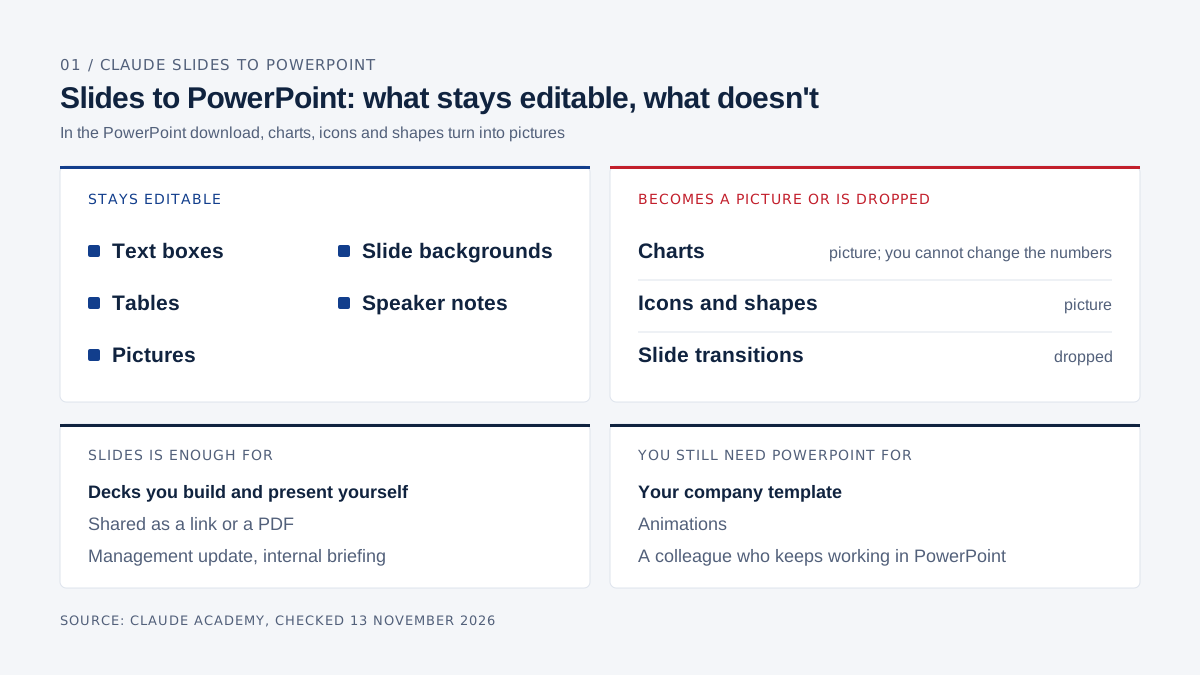
Claude Slides is enough for decks you build, present and share yourself as a link or a PDF, such as a management update or a quick internal briefing. You still need PowerPoint when a deck has to sit in your company template, needs animations, or goes to a colleague who keeps working on it in PowerPoint. Anthropic launched Claude Slides as a beta on 16 September 2026. You ask for a presentation in the conversation, edit any element by hand, present from Claude and download the deck as PowerPoint or PDF. In the PowerPoint download, text boxes, tables and pictures stay editable, while charts, icons and shapes turn into pictures. Status as of 13 November 2026.
How Claude compares with the rest of Microsoft 365 is in Claude vs Microsoft 365. This one covers presentations only.
Two Claude products make slides, and their names are close. Claude Slides builds the deck inside Claude. Claude for PowerPoint is an add-in that runs inside PowerPoint, which means you keep paying for Microsoft 365.
AI Board is built on Claude. Every product claim below links to Anthropic's or Microsoft's own pages.
How does Claude Slides work?
You ask for a presentation in an ordinary Claude conversation, Claude drafts the slides, and from there you either edit them by hand, leave Claude a comment on a slide, or say in the chat what should change.
Anthropic introduced Claude Slides on 16 September 2026, together with Claude Docs, on the day chat and Cowork merged into one Claude. According to the Claude Academy guide, you can ask for a deck in any conversation, on the web, in the desktop app or on your phone. Tell Claude what the deck is for and who will read it. Where a figure is missing, Claude leaves a visible placeholder on the slide and says so in its reply.
Hand editing works the way it does in PowerPoint or Keynote. You click to select, double-click text to retype it and drag to move or resize. In our own test on 13 November, the toolbar under the slide had buttons for text, image, table, shapes, a comment and "Ask Claude", with download and present at the top right and "Add slide" at the top left. Slide thumbnails let you add slides, drag them into a new order or duplicate one, and "Skip slide" keeps a slide out of the presentation without deleting it. Changes save as you go.
A comment for Claude works like a comment for a colleague. You click the chart or text you want changed, write your request with "Send to Claude" ticked, and Claude edits the slide and replies in the thread. You need edit access to do this.
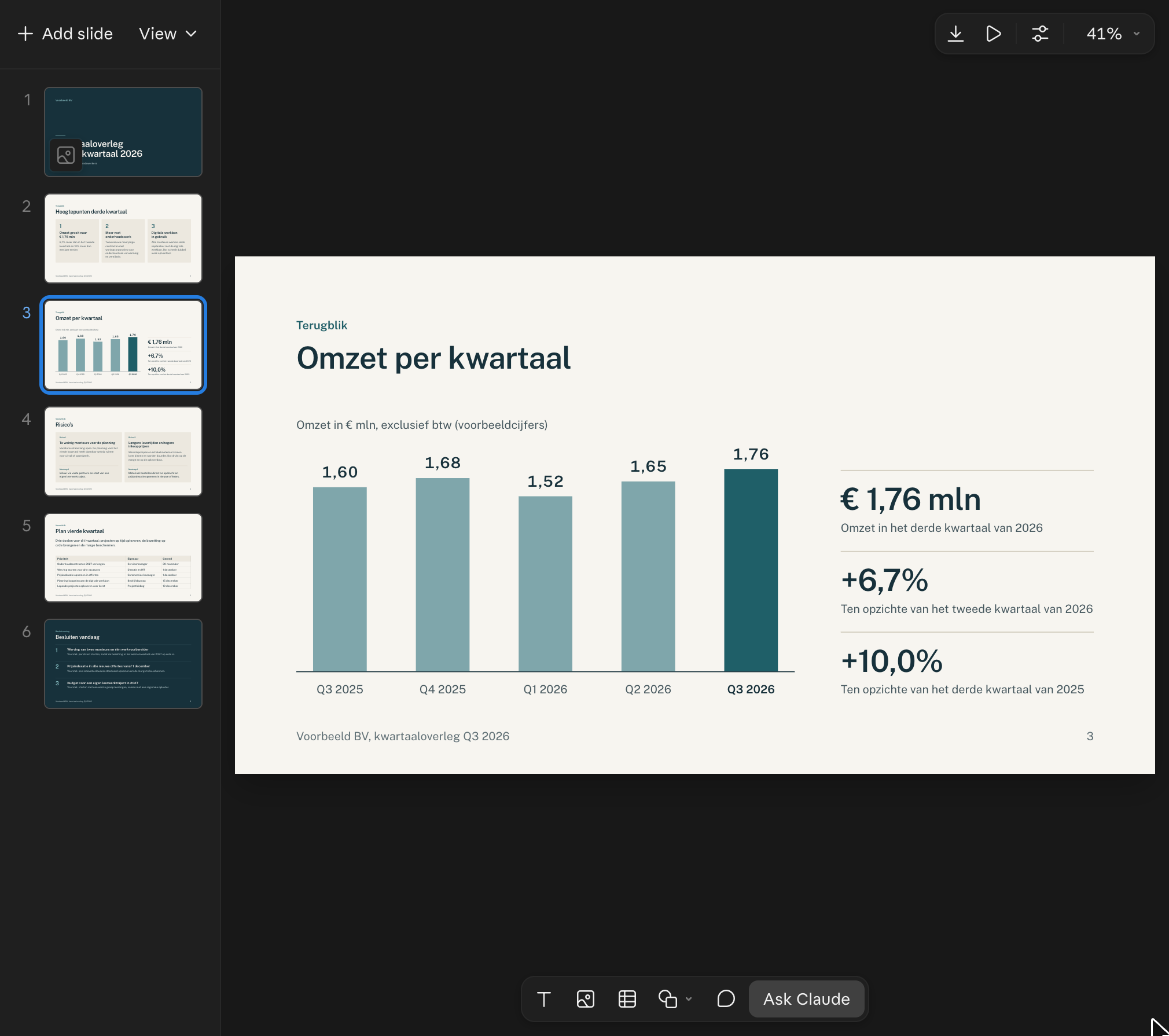
Screenshot from Claude, 13 November 2026. Voorbeeld BV and its figures are fictional.
"Present" plays the deck full screen inside Claude. "Present with speaker notes" opens a second window with your notes, a clock, and the current and next slide. Claude can write those notes for you, and they never appear on the slide.
Sharing runs through one link that also opens on your phone. You choose whether people can view, comment or edit, and teammates with edit access can work in the deck at the same time as you. People you invite by email need a Claude account. On Team and Enterprise, an owner of your organisation decides whether you can share outside it, and you cannot change sharing settings in the iOS or Android app.
Downloads come in five forms: PDF, a web page (.html) that keeps the slide transitions, the current slide as an image (.png), and PowerPoint in two versions, one with your fonts and one with fonts every computer has. Our own download menu showed exactly those five, with the note "Basic fonts work on any computer" on the second PowerPoint option. With Google Drive connected, you can also send the deck to Google Slides as an editable copy.
Claude Design, which Anthropic describes as making on-brand visuals and mockups, also works inside the conversation since 16 September. If you have a design system set up in Claude, Claude builds your deck in your brand's fonts and colours. Without one, you can attach an existing deck or brand file and ask Claude to match its look. Anthropic does not describe importing a PowerPoint template (.potx) or slide master.
claude.com/pricing lists Claude Slides on every plan, Free included. It launched as a beta on 16 September 2026 and has been out of beta on every plan since 8 October 2026. On Team and Enterprise, an owner switches Slides on or off under Organization settings > Artifacts.
Can you edit a Claude Slides deck in PowerPoint?
Mostly, yes: text boxes, tables, pictures, slide backgrounds and speaker notes stay editable in PowerPoint, but charts, icons and shapes arrive as pictures.
| Part of your deck | In the PowerPoint download |
|---|---|
| Text boxes, tables, pictures | editable |
| Slide backgrounds and speaker notes | editable |
| Charts | picture; you cannot change the numbers |
| Icons and shapes | picture |
| Slide transitions | dropped (kept in the .html download) |
| Slides marked "Skip slide" | dropped |
Source: Claude Academy, checked 13 November 2026.
For a managing director this mostly affects the quarterly revenue chart. Once it is a picture inside the .pptx, your finance lead cannot nudge a bar in PowerPoint. You either ask Claude to update the chart in Slides and download again, or you rebuild it in PowerPoint.
When the file goes to someone whose computer you don't know, such as your accountant or the bank, pick the basic-fonts version.
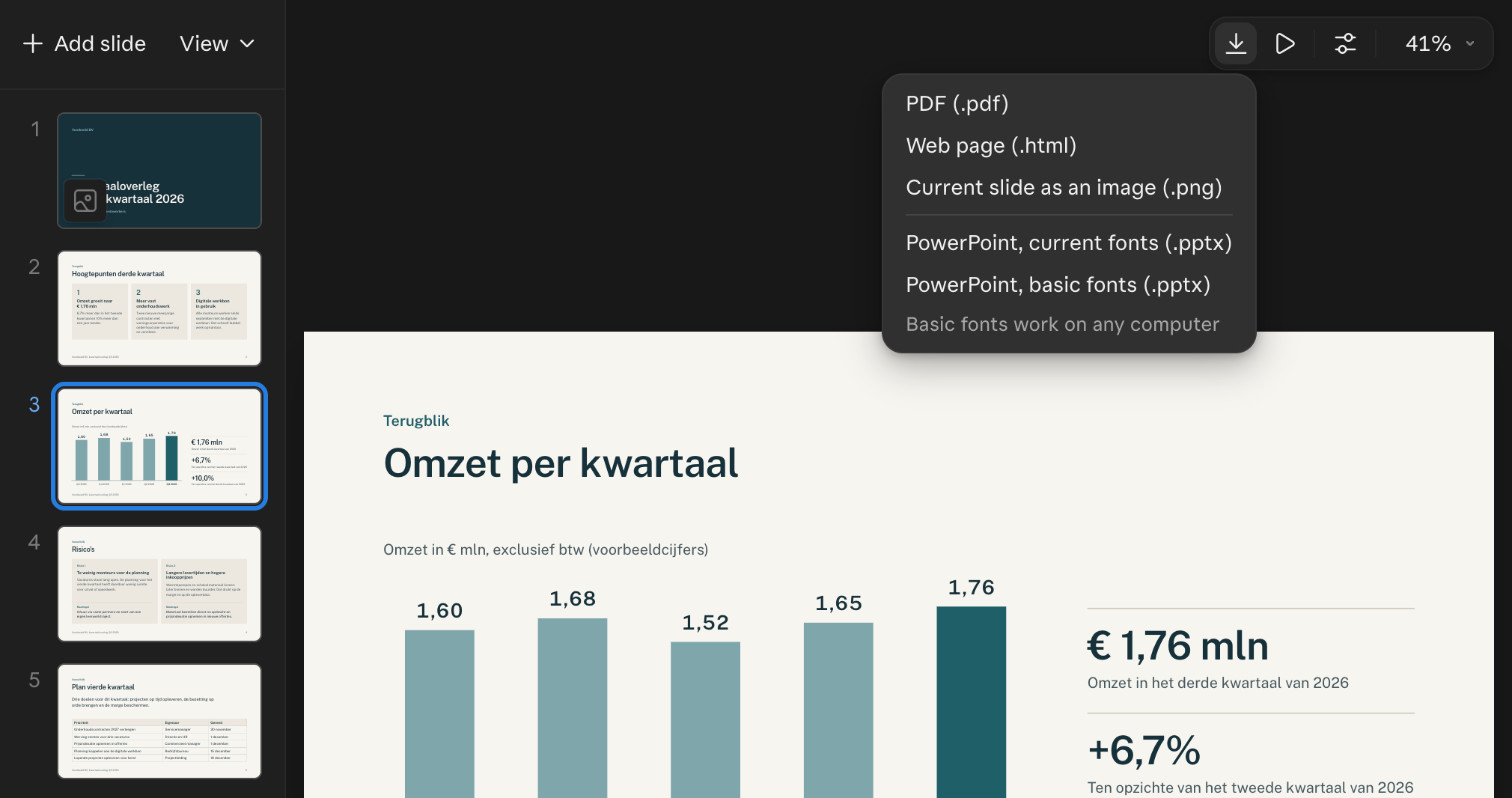
Screenshot from Claude, 13 November 2026.
What does PowerPoint do that Claude Slides does not?
PowerPoint has your company's slide master and template, object-level animations, Presenter View on the desktop, and real-time co-authoring on every major platform.
The slide master is where you set fonts and images such as your logo once, and every slide based on it picks up your changes, Microsoft explains. If your company has a template with a logo, colours and fixed layouts, your brand lives in that master. You edit it in PowerPoint for Windows and Mac, not on the web. Animations and transitions are fully supported on desktop and mobile and limited on the web; animation triggers only work on Windows.
Presenter View starts by itself in PowerPoint for Windows when you plug in a second screen, with your notes, zoom, a pen and a black-screen option, according to Microsoft. PowerPoint on the web, Android and iOS has no Presenter View.
Copilot in PowerPoint builds a presentation from a prompt or a Word document. Start from your organisation's standard template and Copilot keeps its theme and design, Microsoft says. Copilot is not part of every Microsoft 365 subscription; what it costs is in our Copilot cost guide.
| Claude Slides | PowerPoint | |
|---|---|---|
| Making a deck | ask in the conversation | build it yourself, or with Copilot or Claude for PowerPoint |
| Brand | design system in Claude, or match a sample deck | your organisation's slide master and template |
| Hand editing | select, type, drag | everything, including the slide master (Windows and Mac) |
| AI help on a slide | comment with "Send to Claude" | Copilot, or the Claude for PowerPoint panel |
| Animations | transitions in the .html download; Anthropic does not describe object animations | animations and transitions, triggers on Windows |
| Presenting | "Present" and "Present with speaker notes" in Claude | Presenter View on Windows and Mac |
| Co-editing | at the same time in the deck, with a Claude account | real time on PC, web, Mac, Android and iOS |
| Sharing | a link that opens on your phone | the file |
| Cost | every Claude plan, Free included | Business Basic €6.07 (web and mobile), Business Standard €12.13 (desktop) |
Sources: Claude Academy, claude.com/pricing, Microsoft's platform comparison and Microsoft 365 Business pricing in the Netherlands, checked 13 November 2026. Microsoft prices per user per month, annual billing, excluding VAT.
What does Claude for PowerPoint do?
Claude for PowerPoint is an add-in that puts Claude inside PowerPoint: it builds slides in your template, changes only the slide you point it at, and makes charts and diagrams as real PowerPoint objects.
Anthropic made Claude for Excel, PowerPoint and Word generally available on 7 May 2026. The documentation lists it for Pro, Max, Team and Enterprise, so not for Free.
Claude reads the slide master, layouts, fonts and colour scheme of your deck and uses them for every new slide. You select a slide and say what should change, and Claude edits that slide without regenerating the rest. It turns bullet points into diagrams or native PowerPoint charts that you can edit afterwards, which Anthropic contrasts with static images.
The add-in runs in PowerPoint on the web, in PowerPoint for Windows with a Microsoft 365 subscription, and in PowerPoint for Mac from version 16.46. It does not run in perpetual-licence PowerPoint 2016 or 2019, or on iPad or Android. You install it from Microsoft AppSource, or your administrator deploys it from the Microsoft 365 admin centre.
The same documentation recommends using the add-in only with files you trust, because an outside file can carry hidden instructions. Tell your IT lead too that Claude for PowerPoint activity does not appear in Enterprise audit logs, although it is covered by the Compliance API where that is enabled.
Which one fits which task?
For a deck you build and present yourself, Claude Slides is usually enough. Once a template, a recipient who wants to edit, or a colleague in PowerPoint is involved, I work in PowerPoint, ideally with Claude for PowerPoint.
| Task | Claude Slides | PowerPoint (with or without Claude for PowerPoint) | My pick |
|---|---|---|---|
| Quarterly numbers for the management team | From figures to slides with speaker notes, fast | Native charts your finance lead can update | Slides if you present and the team only watches; PowerPoint if the charts live on after the meeting |
| Sales pitch in your house style | Fonts and colours through a design system | Your slide master; Claude for PowerPoint builds inside it | PowerPoint with Claude for PowerPoint |
| Deck for the bank | PDF, or PowerPoint with basic fonts | A .pptx the bank or your accountant can edit | Slides and a PDF, unless the bank asks for an editable file |
| Quick internal update | Share the link, colleagues reply in comments | Open the template and build it yourself | Slides |
| Presenting on a screen at a client's office | Second window with notes, clock and next slide | Presenter View starts by itself on a second screen (Windows) | Either; with Slides, bring the PDF as a fallback |
| Deck a colleague will keep editing | A colleague with a Claude account edits along; in the .pptx, charts become pictures | Real-time co-authoring in the same file | PowerPoint if that colleague works in PowerPoint |
Worked example: a ten-slide quarterly review
In Claude Slides you type one request with your numbers attached, get a deck with placeholders where a figure is missing, and then fix titles, one chart and the running order before you present.
Take the owner of a building services company who meets her four-person management team every quarter. She attaches the quarterly figures exported from the accounting system and her notes from the last meeting, and types:
Build a ten-slide deck for Thursday's quarterly review with my management team (four people).
Use the attached quarterly figures and my notes from the last meeting.
Structure:
1. Title and date
2. Today's three topics
3. Revenue and gross margin per quarter, this year next to last year
4. Order book for the coming quarter
5. Headcount and absence
6. What went well
7. What fell behind, and why
8. Three decisions I need today
9. Plan for next quarter
10. Questions
Plain business English, at most five lines per slide.
Write speaker notes for every slide.
If a figure is missing, leave a visible placeholder and tell me which figure you need.
The deck then sits in Claude with speaker notes on each slide. If absence figures are not in the export, slide 5 should carry a visible placeholder and the reply should say so. In our own test, with a shorter request, Claude built six slides in about five minutes, including a bar chart of revenue per quarter as a proper slide and a table on the planning slide.
Then she edits. She double-clicks the titles of slides 6 and 7 and retypes them in her own words. On the slide 3 chart she leaves a comment with "Send to Claude": "Put last year next to this year as a lighter bar." She rewrites the three decisions on slide 8 herself, since that is her case to the team. If she wants to open with the decisions, she drags slide 8 forward, and slide 10 gets "Skip slide" if there is no Q&A. The day before, she shares the link with comment access. On Thursday she presents with "Present with speaker notes", and afterwards she downloads the PDF for the minutes.
In PowerPoint with Claude for PowerPoint, she would type the same request in the Claude panel of her open company template, and Claude would build the slides in her slide master. Asking for a Q1 to Q4 bar chart on slide 3 gives a native chart her finance lead can update later.
| Step | Claude Slides | PowerPoint with Claude for PowerPoint | PowerPoint without AI |
|---|---|---|---|
| Start | request in the conversation | open the template, request in the Claude panel | open the template |
| Look | design system or sample deck | company slide master | company slide master |
| Chart on slide 3 | built by Claude; a picture in the .pptx | native chart | build it yourself |
| Changes | click, drag, comment for Claude | select a slide and ask, or edit yourself | by hand |
| Presenting | "Present with speaker notes" | Presenter View | Presenter View |
| Sharing with the team | link | file, co-authoring | file, co-authoring |
| Licences | any Claude plan | Claude Pro or higher plus Microsoft 365 | Microsoft 365 |
When is Claude Slides enough, and when do you keep PowerPoint?
Claude Slides is enough when you build and present the deck and the audience gets a link or a PDF. PowerPoint stays when a template, animations or a colleague working in PowerPoint shape the deck.
Slides covers the quarterly review, the monthly management update and a deck for someone who only reads it, such as the bank. PowerPoint stays for decks in your company template, for charts other people keep updating, for object animations, and for colleagues, clients or advisers without a Claude account. If a deck will eventually leave the building in your house style, start in PowerPoint with Claude for PowerPoint. A download from Slides turns your charts into pictures, and you end up doing that work twice.
If you mainly pay for Microsoft 365 to get PowerPoint, Slides may be enough. Microsoft 365 Business also carries your mail, Teams and OneDrive, though, and what you can cancel is covered in the main article of this series. For documents, read Claude Docs vs Word; for spreadsheets, Claude Sheets vs Excel.
Claude inside PowerPoint means paying for both. Claude Pro costs €15 ($17) per month on annual billing or €18 ($20) monthly (claude.com/pricing), and you need a Microsoft 365 licence on top. PowerPoint on the web comes with Business Basic at €6.07, the desktop app with Business Standard at €12.13, per user per month on annual billing, excluding VAT (microsoft.com). The Claude plans are compared in Claude for business.
What can't Claude Slides do?
Claude Slides does not work with your company's slide master, delivers charts as pictures in the PowerPoint download, and does not describe object animations.
- You cannot import a PowerPoint template. Anthropic describes a design system or a sample deck, not a .potx file or slide master.
- Charts don't refresh themselves. They show the data from when Claude built them, and in the .pptx they are pictures.
- Photos: Claude Academy notes that Claude may not be able to find or create photos for you.
- Sharing has limits. People you invite need a Claude account, and on Team and Enterprise an owner decides about sharing outside the organisation.
- Slides launched on 16 September 2026 and only left beta on 8 October 2026, so features and limits may still change.
Frequently asked questions
Is Claude Slides free?
Yes. claude.com/pricing lists Claude Slides on every plan, Free included, as of 13 November 2026. Claude for PowerPoint, the add-in inside PowerPoint, needs a paid plan from Pro upwards.
Can I edit a Claude Slides deck in PowerPoint?
Mostly. In the PowerPoint download, text boxes, tables, pictures, backgrounds and speaker notes stay editable. Charts, icons and shapes become pictures, according to Claude Academy.
What is the difference between Claude Slides and Claude for PowerPoint?
Claude Slides builds and shows the deck inside Claude and works without Microsoft 365. Claude for PowerPoint runs inside PowerPoint, builds in your template and makes native charts, and it needs a Claude plan from Pro upwards plus PowerPoint, per Anthropic's documentation.
Can Claude Slides use my brand?
Partly. With a design system in Claude, Claude builds your deck in your brand's fonts and colours, or you can ask it to match a sample deck. If the deck has to sit exactly in your PowerPoint template, use Claude for PowerPoint.
Do I still need PowerPoint if I have Claude?
Often not, for decks you build and present yourself. For a company template, colleagues in PowerPoint or charts other people keep updating, you do. What else Microsoft 365 does for you, such as mail and Teams, is covered in Claude vs Microsoft 365.
AI Board is your personal AI assistant that makes you AI-native: it runs on your own laptop, grounded in your company's data, and gets sharper as your knowledge grows. Private by design, reasoning at CEO, CFO and CTO level, so you ride the AI wave instead of swimming behind it.